
Waze Suggestion Box
- There’s power in numbers! Search through existing suggestions to see if there's someone else with a similar idea and upvote it.
- You can build upon an idea -- simply comment below your fellow Wazer's submission.
- This forum is intended for user feedback and ideas. If you have an issue which needs support, please visit our help center.
- Any comments, feedback, ideas, reports, suggestions, or other information you provide to Waze (part of Google LLC) about Waze products and services (collectively “Feedback”) is not part of your personal data.
- You agree not to disclose, in your Feedback, to Waze any information, such as third-party information, that you are obligated to maintain as confidential.
- Waze has no obligation to use your Feedback.
- By submitting your Feedback in this page, you acknowledge that you are of the minimum age required to provide data processing consent in the applicable country where you are located and that you provide permission to Waze, and its affiliates, to use your Feedback and any information that personally identifies you to improve Waze’s current and future products and services in accordance with Waze's Privacy Policy (waze.com/legal/privacy).
- Please avoid providing any personal information in your Feedback.
- Providing a name, when submitting Feedback, is optional. If you choose to provide your name, it will be publicly displayed in this forum next to your Feedback. You can delete your name and provide your Feedback as an anonymous user at any time.
946 results found
-
Get rid of the pop up search window....pain in the A$$.
Don't need the distraction of the pop up search box covering the map.....or make it an option to TURN OFF!
2 votesSearch bar automatically hides after some time when driving without navigation.
-
Screen dimming or even shutdown when the vehicle stops
Wase. Please create a screen dimming (or even shutdown) when the vehicle stops and automatically reactivate when moving again. This would be very good for nature (energy saving) and for increasing privacy and security inside the vehicle.
2 votesGreat thinking! The issue you raised has been addressed in a recent redesign. Hope you like it!
-
2 votes
Great news! Android Auto is now available in Waze for Lexus' car models ES 2020, NX 2020, RC 2020, RX 2020, UX 2020. Install the latest app version to check it out.
-
remettre les instruction vocales
remettre les instruction vocales
2 votesGreat thinking! The issue you raised has been addressed in a recent redesign. Hope you like it!
-
Resize directions box while connected to Android Auto
After recent updates, the box displaying directions covers half the screen when connected to Android Auto. Please shrink the box, allow users to move it or resize it. It makes it difficult to see where you are going on the map sometimes.
2 votesGreat news! The feature of reducing the size of upcoming turn/direction/navigation box in Android Auto is now available in Waze. Install the latest app version to check it out.
-
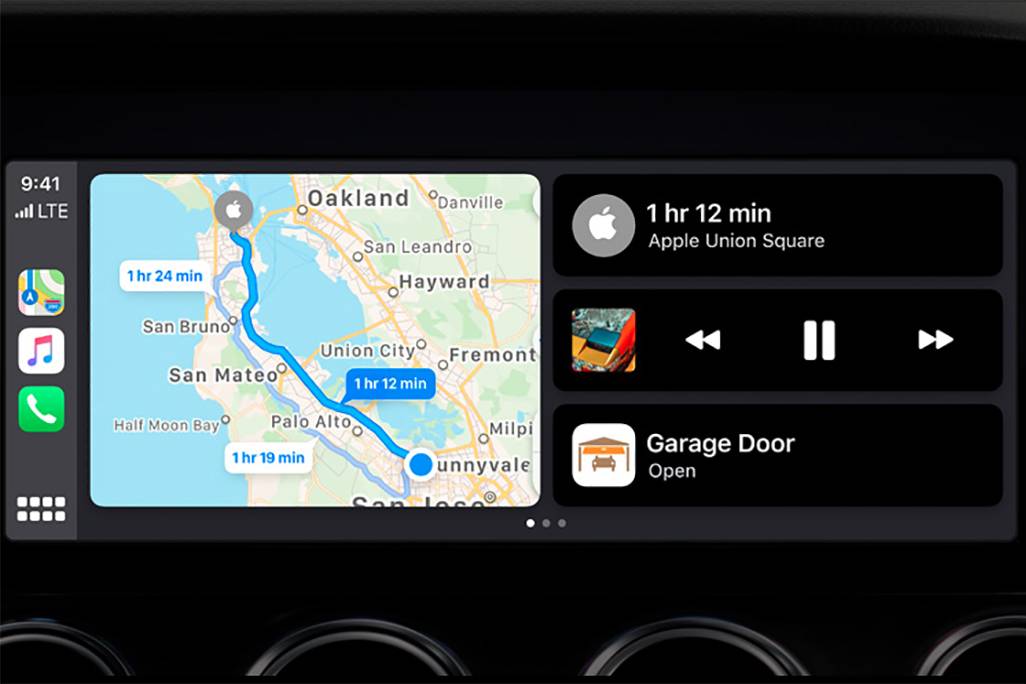
CarPlay Home Screen
Recently the Google maps have been updated to the latest version and they received a new option, now they can be launched on the CarPlay home screen which is divided in to 2 parts, before that there was able to use Apple maps only at that way. This is super comfy tool. Pls look at the pic. below
https://images.cars.com/cldstatic/wp-content/uploads/New-Apple-CarPlay-dashboard-view-Apple.jpg2 votesGreat news! Waze is now available on CarPlay Dashboard. Thanks for your suggestion.
-
Lanes description
Recently there was a graphic description of the lanes before approaching a junction, so the driver can see what lanes exist and which one to choose. And after a while it was removed. It was nice and helpful, please give an option to put it back.
2 votesGreat news! One of the most requested suggestions – Lane Guidance, is now available in Waze. Thanks for your suggestion. Drive safely!
-
to be able to delete "all" in navigation searches and navigation history
i work for a delivery service and would like to be able to delete "all" searches and history at once instead of one by one. I use only waze and have up to 15 deliveries in a day. Over a weeks time or more it builds up
this is so frustrating that there is no delete ALL2 votesYou can easily clear your driving history via Settings – Privacy – Drive history – Delete all drives
-
Voice reports
As of July 2020 Western Australian will attract 4 demerit points and a One Thousand dollar fine if we do much as touch our phones, even if in a cradle. I would like to be able to give a voice report on traffic conditions as I encounter them on a journey.
2 votesGreat news! Voice reporting is now available with Google Assistant in Waze.
-
2 votes
Great news! Audible app is now integrated with Waze!
-
Additional support for Apple Carplay
All the features of Waze are not available in Apple CarPlay... like policeman on other side of road or object in road. Please add all features of Waze to CarPlay.
2 votesThank you for your suggestion! As you may already know, Waze is already supported on CarPlay. Stay tuned for more feature updates on Waze’s social pages on Facebook and Instagram
-
Waze Lite - Highway Mode
Mostly you need Waze to make routing decisions. Once you are on a main highway there are no real decisions to be made.
Would be nice to be able to put Waze into a mode that would sleep and only popup say 2km before you need to get off the highway.2 votesBattery Saver mode is a great choice for this purpose.
-
Add Costco and Sam's Club to favorite gas stations list
Add Costco and Sam's Club to favorite gas stations list.
2 votesList of available gas station brands is configurable at country level. Please contact your local map editors community for more details.
-
Calculate tolls for each route.
In many countries, tolls have a substantial price difference depending on the hour of the day, and toll-less routes are often just terribly crowded. Being able to choose between 2 or more toll roads knowing in advance how much each route costs would allow us to make an intelligent decision!
En muchos países, los peajes tienen diferencias sustanciales dependiendo de la hora, y las rutas sin peajes suelen estar colapsadas. Sería mucho más inteligente poder elegir entre 2 o más rutas con peaje, sabiendo cuál sería el costo de cada una al momento de elegir!
2 votesThank you for your suggestion! As you may know, Waze calculates and displays toll prices in many parts of the world. To know when this becomes available in your country, stay tuned on Waze’s social pages on Facebook and Instagram
-
And the ability to store your current location as a favourite so you can return to this point again without having to know the address
As a user I would like to be able to store my current location into my favourites so that I can return to this location again in the future without having to know the address.
2 votesHere’s the flow:
1. Long tap on your location
2. Tap on ‘More’ menu (three dots)
3. Tap on ‘Preview location’
4. Tap on a star at the left side of location preview page
4. Set name for this new favorite and tap ‘Done’ -
Show Speedometer outside Path Navigation
Without the need to define a path, having the option to show the Speedometer outside a Navigation Session would be useful just to show the speed of the current user, either on a car, motorcycle, on foot, etc.
This, with the addition of a full-screen Speedometer, would be even great.
2 votesGreat news! This functionality is already available in Waze. Via Speedometer settings you’re able to set speedometer and/or current speed limit to be always displayed in app – even in free drive mode.
-
CarPlay
Incorporar voice control para WaZe en CarPlay
2 votesThank you for your suggestion! As you may already know, Waze is already supported on CarPlay. Stay tuned for more feature updates on Waze’s social pages on Facebook and Instagram
-
Integrate Napster Music App
Integrate Napster Music App
2 votesThank you for your suggestion! As you may already know, Waze is now integrated with several audio apps including Spotify, Deezer, TuneIn, iHeart Radio, Pandora and more. Just go to Settings > Audio Player and pick your favorite app.
-
calling while using waze
I think it would be very good if it will be possible to keep waze on the screen while you making a call
thanks2 votesPlease use ‘Keep Waze on top’ function.
-
Auto-off when I'm done
I always manually turn Waze off when I'm done navigating to conserve battery. If I forget, Waze eats my battery long after I'm done with it. Be a good iPhone app and stop using my GPS after I've stopped navigation and closed the app.
2 votesSet your location permission to ‘While in use’, this should fix the issue.


- Don't see your idea?