
Waze Suggestion Box
- There’s power in numbers! Search through existing suggestions to see if there's someone else with a similar idea and upvote it.
- You can build upon an idea -- simply comment below your fellow Wazer's submission.
- This forum is intended for user feedback and ideas. If you have an issue which needs support, please visit our help center.
- Any comments, feedback, ideas, reports, suggestions, or other information you provide to Waze (part of Google LLC) about Waze products and services (collectively “Feedback”) is not part of your personal data.
- You agree not to disclose, in your Feedback, to Waze any information, such as third-party information, that you are obligated to maintain as confidential.
- Waze has no obligation to use your Feedback.
- By submitting your Feedback in this page, you acknowledge that you are of the minimum age required to provide data processing consent in the applicable country where you are located and that you provide permission to Waze, and its affiliates, to use your Feedback and any information that personally identifies you to improve Waze’s current and future products and services in accordance with Waze's Privacy Policy (waze.com/legal/privacy).
- Please avoid providing any personal information in your Feedback.
- Providing a name, when submitting Feedback, is optional. If you choose to provide your name, it will be publicly displayed in this forum next to your Feedback. You can delete your name and provide your Feedback as an anonymous user at any time.
1048 results found
-
Update
Update Waze with satellite viewing to get more detailed view of area and when traveling.
1 vote -
Happy Icon
Big fan of Waze! I think Waze should add a “no traffic” face icon that we can tap to indicate when the road is clear and traffic-free.
2 votes -
Longer information
Please also add that the full destination information should stay visible on the screen even after you reach the destination. Right now, the second it says ‘Destination reached,’ everything disappears and you have to grab your phone or papers again — or go back into the history — just to double-check the exact house number. It’s really annoying
2 votes -
Enable a Satellite view in Android Auto like GMaps has.
Enable a satellite view in Android Auto like GMaps has. More intuitive in congested areas.
2 votes -
SPLIT: icons for “passing lane locations”, food stops, 24/7 fuel locations
Other additions for highway information could be icons for “passing lane locations”, food stops, 24/7 fuel locations
1 vote -
Speed limit icon too small
I absolutely love this app—it's my go-to navigation tool, and I wouldn't be taking the time to give this feedback if I didn’t value it so much.
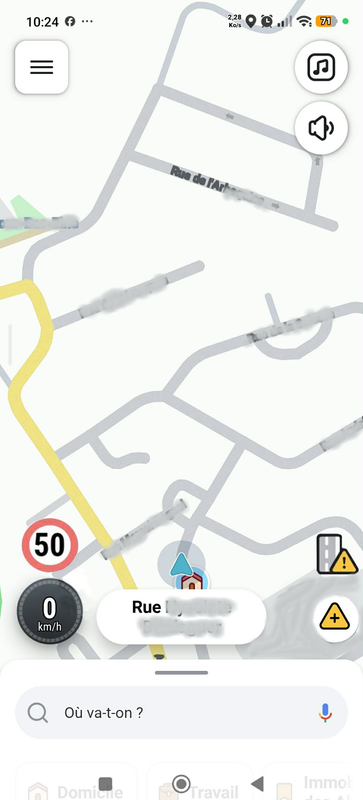
During my first big ride out last weekend, I noticed one significant issue: the speed limit icon(the red circle) is simply too small. I find myself having to shift my focus and move my eyes about six inches from the screen just to read it.
While I understand I shouldn’t rely solely on the app for speed limit confirmation, it’s incredibly useful in a pinch. Ideally, the icon should be about the size…
16 votes -
Incorporate gas stations pump prices on the map screen
While driving you don’t want to switch between screen pages looking for gas stations and pump prices
The information is already there just need to is modify the software to add pump pricesthe map screen7 votes -
Add "Baby", the Black 67 Chevy Impala from Supernatural as a vehicle choice.
With the millions of fans of the Supernatural series, we would love to have Dean's car "Baby" as an option.
3 votes -
Lane Arrows
The colors of the arrows indicating which lane to stay in should have a more distinct difference in color. It's very hard to tell the difference at first glance. Maybe making the arrows that indicate which lane to stay in a bright yellow, would be more helpful.
1 vote -
Ambulance as a vehicle type
Add an ambulance as a vehicle type on the map for us in EMS especially when we are working and using waze
1 vote -
Enhanced 3D Junction View for Improved Navigation with 3D illustrations
Enhanced 3D Junction View for Improved Navigation
The current Waze display on the BMW X1's 8-inch screen utilizes the full space but lacks critical lane-level detail, especially during complex maneuvers. Implementing enhanced 3D illustrations for specific challenging road features would significantly improve driver clarity and safety.- Complex Interchanges and Lane Guidance For junctions where a simple directional arrow is insufficient, a dynamic 3D view is needed to guide drivers into the correct lane well in advance.
Motorway Splits and Exits:
Need: Show complex motorway splits (e.g., merging onto two separate dual carriageway A-roads) and exits.
Proposed Feature: Display a 3D-rendered…
4 votes -
1 vote
-
School zones on the map display just like what it does with speed cameras for example
Is it possible to have school zones on the map display just like what it does with speed cameras for example and not the hazards icon because it’s confusing and that way people know when a school zone is coming up cause I’m right by 2 schools
0 votes -
Label every street with name and number
display all the streets ..label all the streets with their names and numbers .. when driving a lot of streets are not labeled .. every street should be labeled .
2 votes -
pls bring back showing of cameras on map view
When navigating long distance, Previous version shows the cameras once it is in the map view area.
Current version only shows when much closer like 500m this is too late.
Pls bring back the old version.1 vote -
1 vote
-
1 vote
-
Speed Limit display and Alert Icon quick Selection
Here is an edited screenshot of my two ideas, on the left you have bigger, more visible speed limit indicator, on the right you get a permanently displayed favorite alert icon.(in my case stopped vehicles which is 90% of my sent alerts)
1 vote -
Já há alguns meses que tenho me incomodado com a interface do Waze e queria compartilhar uma sugestão: quando traçamos o destino é durante o
Já há alguns meses que tenho me incomodado com a interface do Waze e queria compartilhar uma sugestão: quando traçamos o destino durante o Trajeto, as informações de chegada , distância e tempo restante ficam do lado esquerdo próximo ao volante e , quando precisamos comunicar um alerta, pesquisar e etc, tudo fica do lado DIREITO da tela e longe da direção. Poderiam inverter a interface para que as sinalizações de alerta e pesquisas estejam do lado direito da tela mais próximo ao volante. Assim, o processo de notificar dia mais perto, seguro e o que precisamos apenas ler, ficaria…
1 vote -
1 vote
- Don't see your idea?