
Waze Suggestion Box
- There’s power in numbers! Search through existing suggestions to see if there's someone else with a similar idea and upvote it.
- You can build upon an idea -- simply comment below your fellow Wazer's submission.
- This forum is intended for user feedback and ideas. If you have an issue which needs support, please visit our help center.
- Any comments, feedback, ideas, reports, suggestions, or other information you provide to Waze (part of Google LLC) about Waze products and services (collectively “Feedback”) is not part of your personal data.
- You agree not to disclose, in your Feedback, to Waze any information, such as third-party information, that you are obligated to maintain as confidential.
- Waze has no obligation to use your Feedback.
- By submitting your Feedback in this page, you acknowledge that you are of the minimum age required to provide data processing consent in the applicable country where you are located and that you provide permission to Waze, and its affiliates, to use your Feedback and any information that personally identifies you to improve Waze’s current and future products and services in accordance with Waze's Privacy Policy (waze.com/legal/privacy).
- Please avoid providing any personal information in your Feedback.
- Providing a name, when submitting Feedback, is optional. If you choose to provide your name, it will be publicly displayed in this forum next to your Feedback. You can delete your name and provide your Feedback as an anonymous user at any time.
- or
552 results found
-
Re-attempt to connect to mobile/wifi signal after starting on offline map
When a car is parked in underground carpark with no mobile phone signal, Waze will use the offline map with no traffic information However it does not re-attempt to connect to mobile signal/wifi after a minute or two when the car is out in open air, and it continues the whole journal on offline map. Please enable a function to re-try connecting to phone signal via CarPlay
2 votes -
Suggestion for improvements to the charging station search on Waze
Dear Sir/Madam,
With the proliferation of electric vehicles, it is crucial to optimize the charging station search on Waze to make it a recommended reference. Below, I propose specific improvements to enhance this feature.AA CarPlay / Displaying power, not speed status
Currently, on Android Auto, I notice that Waze displays vague indications ("Fast", "Medium", "Very Fast") rather than the power in kW. I would like the exact power to be indicated to better inform users.App / Displaying availability on the map
This feature, which was previously available, has disappeared. I find that displaying the number of free connectors…
1 vote -
Waze app crashing on Eonon R63
Waze app is crashing in Eonon R63 android card headunit.
Google Maps is working fine without issues.
Can you please look into this and fix it?
1 voteThanks for reaching out. Please note this platform is dedicated to ideas and suggestions for the Waze app. If your idea is for a Community platform like the Waze Map Editor, please submit it through the Community forum. If you need help using Waze, please click here to reach the "Waze support" page.
-
Improve location of command bottons on Waze for Android Automotive (AAOS)
Command bottons are currently located in the upper right hand side of the screen, which makes difficult to use when driving. It would be much better if the command bottons would be placed in the bottom side of the screen, because it would make it more ergonomic to use (like it happens in Apple CarPlay version).
Thanks.1 vote -
Railroad Crossing Alert
With the latest software on iOS/CarPlay (version 4.103.1.1), when I receive an alert for a railroad crossing and I close it by pressing the Close button, it keeps popping up until I cross over the railroad crossing. My daily commute involves a railroad crossing that I pass over everyday and the ONLY way to close the alert is to ignore it and eventually it closes on its own.
2 votes -
BUG: Apple route direction "stack" on phone not updating during drive
When using Apple Carplay, the latest version is NOT updating the text direction "stack" seen on the phone while driving. Previous versions would remove the turns after they've been completed. The only way to get the stack updated is to toggle to road reports then toggle back to the directions on the phone.
1 vote -
Weather summary for current location and/or destination location
On the map screen (phone and CarPlay screen) there should be a weather summary (temp and forecast for rain/snow/etc) for either your either your current location or your destination location. Maybe have a spot in the settings to turn this option on/off and which location you want the weather information for.
1 vote -
Navigate to dropped pin
On BMW (OS8.5) and CarPlay it is not possible to touch map/display and mark a pin and navigate to it. Search for address or voice command with address is only possible. It would be much easier to mark pin and go in some cases when you do not know the address or you don't need address.
1 vote -
Add more than one stop
Being unable to add only one stop makes Waze secondary to Maps and renders it obsolete. The way it is designed makes it a fun app, not an applicable tool. I will be removing Waze from my Honda’s CarPlay and try to figure out how to use Maps. I find it essential to have ALL stops included in my trips; I don’t have the time during a “trip” to get out my phone to keep renavigating.
2 votes -
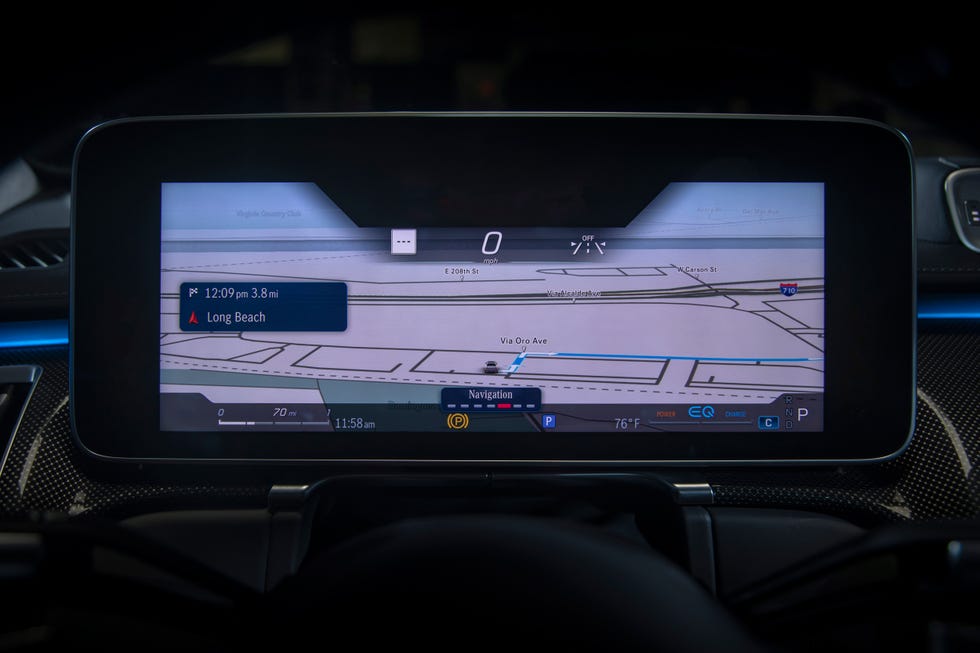
waze on instrumental cluster for new Mercedes from 2023 c, e, glc, s class MBUX 2.6
Now new Mercedes with MBUX 2.6 has maps (but just a oroginal MB maps) on instrumental cluster in 2 options (see photos). If we can choose waze carplay option on this screen, that would be amazing!!! Thanks
https://images.carexpert.com.au/resize/3000/-/app/uploads/2022/06/2022-mercedes-benz-c300-c-class-35.jpg?_gl=1*1xnfx7s*_gcl_au*MTMyMTk2OTg5LjE3NDU2ODE5NjM.
https://hips.hearstapps.com/hmg-prod/images/s-class-64-1598979715.jpg?resize=980:*2 votes -
Vehicule type shorcutcut
Hi!
I often switch between motorbike and private car.
The ETA is different because of traffic jam.
It could be easier and faster if we could make an ios shortcut wich could switch it.
Then with an automation like when you plug any carplay device, switch to private car. and when you unplug it, switch again to motorbike.ChatGPT told me to do it opening url with devicetype but its doesnt work.
2 votes -
Copilot feature
I have a suggestion that I think would be excellent and differentiating from other applications. This is a functionality that could be called "Copilot", and that allows a device with a Waze account to establish a new destination to a different device. For example, I have Waze on my device while I'm driving, and my wife can set a new destination for me from her own device without having to touch mine, for that reason I thought the function could be called "Copilot".
This same functionality would also be very useful when navigating with CarPlay, so that I can…
16 votes -
Indicate sub-menus for reporting
When reporting something (in CarPlay) you have to select categories and specific options. From the icon it’s not possible to see which is which. This sometimes results in me sending an incorrect report as I’m trying to find the best match for the situation.
Adding a small triangle or something to the icons of sub-menus would help with this.
1 vote -
False data due to UI
When sitting in heavy traffic, it blocks the view of ETA status until an alert ‘still there’ or ‘not there’ is not selected, in CarPlay mode.
This makes people report false data just to get back to the ETA screen. They don’t even know if that alert is present or not, leading to various occasions of false data.
Suggestion: to enable that pop up in heavy traffic once the user is closer to that located bubble.
2 votes -
Don't hide submitter username when they are a active map editor (at least Level 1 due to signing up for WME access) for Map UR's they report
Don't hide submitter username when they are a active map editor (at least Level 1 due to signing up for WME access) for Map UR's they report in able to make finding them for the reporter in WME easier when getting home so they can add clarification to the UR and if they didn't get to it fast enough and another editor takes a look at it they know what other editor reported it so they can engage with them appropriately either through the Waze Discord chats or a Waze Map Chat DM for better communication workflow then doing it…
2 votes -
Bring back "wrong speed limit" report
I'm using Apple CarPlay if that changes anything.
Some years ago, I could report "wrong speed limit". Now there is no report button like this and it causes the entire reporting worflow much longer: I report a general issue, then someone finds it, asks me what the issue is about (and I don't always remember if it was about the limit), and then I reply and they fix it. It could be just 1 click and then someone fixes it - much faster!
2 votes -
audio
When streaming audio carplay/waze pauses it for an announcement. But the pause is almost delayed 1-2 seconds and I miss out on what is said. It would be best if when audio is paused waze was either more accurate in its pausing or go back ~3-5 seconds when restarting. So as to not miss what is said. I think part of the issue is the fading out of audio.
2 votes -
Replace pop ups with static pane
The pop-up banners showing the next turn make it almost impossible to use any other CarPlay controls such as Music etc. as the Waze banners take the focus. This means that I am unable to change my music while stopped at lights. Popups should still be used for alerts or high-priority info but next turn / lane info should be on a static pane.
2 votes -
Was there an update?
Using CarPlay the option to look at and choose alternate routes is gone. It has been replaced with a second magnifying glass to search for addresses/locations.
Also, on the app on the telephone, you can see alternate routes, but you are unable to choose one different than the one Waze has picked for you.
Was there an update? If so, how can we undo it?
1 vote -
Redesigning the UI in CarPlay so alerts don’t cover up the ETA and force me to click “not here”
Alerts such as road hazards, stalled vehicles, and police presence currently cover up the arrival time and often force me to click “still here” or “not here” before I’ve arrived at the event. not sure if you use that feedback at all, but mine is often inaccurate because of that. Doesn’t seem like it needs to cover up the ETA information.
1 vote


- Don't see your idea?