
Map Editor Suggestions
Welcome to the Map Editor's suggestion box!
This is the place to share your ideas for improving the Waze Map editor.
87 results found
-
New filter "Older than" should apply for URs with no comments
The new UR filter "last comment time: older than: should apply also to those URs with zero comments (automated comment). This way we could monitor URs with automated comments that have not been answered yet by an editor after x days.
62 votesGreat timing! We’re currently working on New filter "Older than" should apply for URs with no comments. Keep an eye out for updates on the WME.
-
Issue Tracker: Add options to "area" and "last comment by"
When using the issue tracker, to make searches more practical and useful, the following options are missing:
1. When specifying last responder, we need option to mark "Not me" as sometimes another user may add comments to a UR he didn't report. Right now, there is no easy way to select these URs.
So, all options for last comment by should be: Anyone, Reporter, Me, Not me.- The search area should have the option "not in managed areas" as a checkbox or other way. When we scan for URs in a large are in "Specific area" (le a country or…
63 votes -
Eliminate Heuristics and auto-generate paths instead.
Heuristics are hidden behind so many elements of the map nowadays. As a result, editors are often expected to read multi-page documentation to understand how to take advantage of them or how to avoid unintended behaviour. In practice, even experienced editors frequently are unaware or uneducated, making this expectation especially unrealistic for new editors.
My suggestion is to eliminate heuristics altogether, and replace them with auto-generated explicit paths/TIOs/etc. Whether it's an H or an # junction, traffic lights, turn instructions, u-turns, etc, everything should be visible and unambiguous in the editor.
Some examples:
1) if a u-turn in an H…106 votesGreat timing! We’re currently working on it. Keep an eye out for updates on the WME.
-
Display the capture date of Satellite imagery
There are solutions to find the capture date, but they are cumbersome and outside of WME.
From discussions with staff, I've been told that the date is present in the data Waze receives from Geo, so please please please surface the capture date of Satellite imagery in WME.
155 votesGreat timing! We’re currently working on the display the capture date of Satellite image. Keep an eye out for updates on the WME.
-
Move layer, refresh, and permalink icons when chat is open.
When you have the chat panel open, the layer, refresh, and permalink icons are hidden. That means when working with an editor in chat, the panel has to be closed to grab a link. Then chat has to be opened again to share it.
70 votesGreat timing! We’re currently working on it. Keep an eye out for updates on the WME.
-
Add "Serial Number" field to Speed Cameras in WME
Currently, when adding or editing a speed camera in the WME, there’s no way to associate it with its official registration or identification. I suggest adding a “Serial Number” field to the speed camera settings.
Having this field would allow editors to input the official serial number of each speed enforcement device, as issued by the government or regulatory agency. This is extremely valuable because:
- It enables verification and validation of the camera against official databases from transportation or metrology authorities.
- It improves accuracy when identifying missing, moved, or deactivated cameras.
- It helps prevent duplicate or outdated hazards, ensuring only…
59 votesGreat timing! We’re currently working on adding a Serial Number field to Speed Cameras in WME. Keep an eye out for updates on the WME.
-
Update current MAP PROBLEMS scanning to disconnected nodes
It is becoming increasingly difficult to identify two segments that are very close to each other but not connected. Sometimes they even sit on top but until you click them, you don't realise that they are not connected.
This leads to many routing issues and is not identified till there is a UR or a chance visual by an editor.
Validator script and Checker.Waze help with this but you have to be at the location editing. It would be really nice if this "disconnected segments with nodes within 5 metres of each other" could be natively searched by Waze scanner…
49 votesGreat timing! We’re currently working on it. Keep an eye out for updates on the WME.
-
Show Where Community Schedules Are Used
In the Community Schedules section of the Waze Map Editor, please make the "Used In" count clickable or provide a way to show a list of school zones using a specific schedule. Currently, it only shows a number, not the actual locations. Recently, I was trying to find a school zone with an incorrect schedule so I could remove it and then delete the Community Schedule, but I couldn’t locate it even after searching an entire province and four major cities.
67 votesGreat timing! We’re currently working on it. Keep an eye out for updates on the WME.
-
keyboard shortcut for adding POI
A significant workflow inefficiency within the Waze Map Editor (WME) currently stems from the lack of keyboard shortcuts for adding Points of Interest (POIs). Users are required to rely solely on mouse interaction – hovering over the POI menu and clicking the desired category – every single time they need to add a new point.
This becomes particularly tedious for editors who frequently utilize specific categories. For instance, I personally rely heavily on the 'OTHER' POI category. This isn't for standard points, but rather as a necessary workaround to map complex Residential Place Points (RPPs) or House Numbers (HNs) that…39 votesGreat timing! We’re currently working on the keyboard shortcut for adding a POI. Keep an eye out for updates on the WME.
-
Segment history - moved house numbers
When looking at segment history, you can see details of house numbers that have been added or removed. When the position of the house number is changed, the history says "House Number: Missing Data". It would be better to list the house number and that it was moved.
46 votesGreat timing! We’re currently working on it. Keep an eye out for updates on the WME.
-
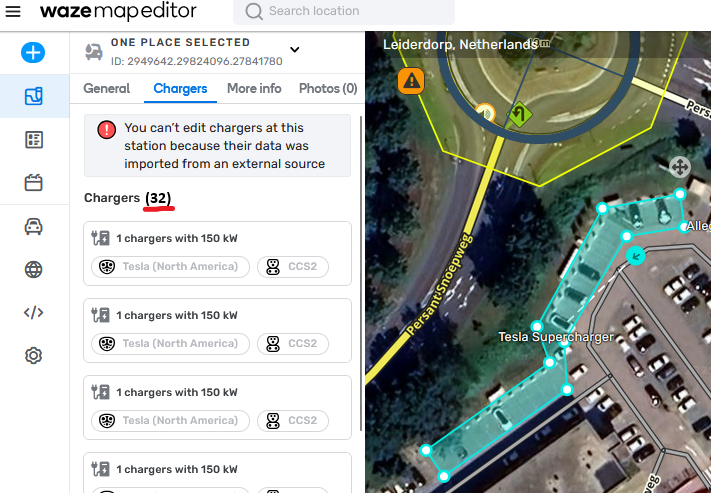
Counter for Chargers at a Charging Station
Please add a counter to charging station tab Chargers. Once you need to scroll (~7+ charging points), it's difficult to assess how many chargers there are. Example: this Tesla Supercharger: https://waze.com/nl/editor?env=row&lat=52.16064&lon=4.54912&zoomLevel=20&venues=2949642.29824096.27841780
Just something like this would suffice: https://i.postimg.cc/90z5LZ8z/afbeelding.png
27 votesGreat timing! We’re currently working on it. Keep an eye out for updates on the WME.
-
House number editing no longer shows reason for HN error
With the recently released change to how we edit house numbers, we no longer see information of why there is a problem (wrong side, already exists, etc). This functionality needs to be added back, or the actual error needs to be added to the error message, so we understand what the issue is.
Details were provided in this beta post.
https://www.waze.com/discuss/t/a-faster-way-to-add-house-numbers-in-wme-for-segments/358469/2079 votesGreat timing! We’re currently working on it. Keep an eye out for updates on the WME.
-
Expand external visual cue on mouseover
Several years ago the WME interface was changed and it reduced how much information was visible when adding an external provider. You could no longer see the difference between two entries because the text simply isn't visible and longer place names make it worse. Editors would have to select a provider to see the address and determine if it was correct. If it was not, they would have to search again and select another entry. Repeat the process until you find the correct entry. If there is no entry, you have tried five different times to find out. For some…
97 votesGreat timing! We’re currently working on it. Keep an eye out for updates on the WME.
-
Add more keyboard shortcut options for drawing Hazards
Right now, we've got a long list of Permanent Hazards available to map, but only two (Speed bump and Speed camera) have assigned keyboard shortcuts.
Having more keyboard shortcuts would be super helpful for productivity. Personally, I think the default shortcut for each hazard could be blank/none, so users can set their own preferred keys for the hazards they use most often.
Link to the forum discussion: https://www.waze.com/discuss/t/new-feature-alert-permanent-hazards-now-available-in-wme-all-environments/350757/36
41 votesGreat timing! We’re currently working on adding more keyboard shortcuts. Keep an eye out for updates on the WME.
-
Add keyboard shortcut for Permanent Hazard Direction
At the moment, the UX isn't very user-friendly when it comes to selecting the direction for Permanent Hazards. We have to choose between A/B without actually seeing where A or B are..! 🙄
A/B are displayed only when segments is selected, but hazard direction can only be adjusted when hazards themselves are selected.
Since we already have a shortcut to 'Toggle segment direction', could we extend this functionality to Hazards as well?
Link to the original discussion: https://www.waze.com/discuss/t/new-feature-alert-permanent-hazards-now-available-in-wme-all-environments/350757/36
30 votesGreat timing! We’re currently working on the keyboard shortcut. Keep an eye out for updates on the WME.
-
Drawing similar type segments
In WME Advanced Preferences, similar to the option to “Draw new roads as two-way,” add an option to be able to change the default Road Type to something other than Street.
Helpful when adding a new highway/freeway or a parking lot where all the segment types are the same, I would like to check a box in the Preferences to either “Draw all segments as [Road Type selection]” or “Default Road Type [selection]”
80 votesGreat timing! We’re currently working on it. Keep an eye out for updates on the WME.
-
Add Driving Restriction option to enable Toll flag for specific date / time / vehicle settings
Driving Restrictions currently has Allowed, Toll Free, Prohibited
But we also need an option to explicitly set Toll EnabledWe have a road that operates as a Toll road for all vehicles 6-9am but then changes to not a Toll road (also for all vehicles) from 9:01am to 5:59am the following day.
We can't use the Toll Free option as there isn't a subset of vehicles that are not charged a Toll during this time period.
Also setting a Toll Free period 9:01 to 5:59 has no impact as the driving restriction is only checked during the hours its active…
50 votesGreat timing! We’re currently working on time-based driving restriction. Keep an eye out for updates on the WME.
-
Support "alternate one ways" as permanent hazards
Allow mapping permanent "alternate one ways" as permanent hazards.
Alternate one ways are two-way roads that are not wide enough for two vehicles to transit in opposite directions at the same time.
In Europe, they are the road section within a square blue sign with two arrows (this side has the right of way) and a white circle with 2 arrows with a red border (this way must give way if someone is already transiting from the other direction).
77 votesGreat timing! We’re currently working on the option to map alternate one ways as permanent hazard. Keep an eye out for updates on the WME.
-
Save all native WME client settings on server side
Base WME client settings are only saved to the local machine, as every time you log in somewhere on a new workstation, you have to go restore your preferences such as Environment, Language, Imperial/Metric, Compact Mode, Transparent Arrows, etc.
However, with the implementation of Issue Tracker, saved filter settings are immediately accessible upon a new login, proving that WME user settings can be saved at the server end.
Please save all native WME settings on the server side so that they are already in place when an existing editor logs in on a new workstation for the first time.
110 votesGreat timing! We're currently working on making your preferences accessible when logging in on a different device. Keep an eye out for updates on the WME.
-
Issue Tracker - add filter by Language
Now that the Language setting is attached to URs, it would be very beneficial in terms of efficiency to have the ability to filter by language in the Issue Tracker.
The filter should allow editors to select one or more languages and either include or exclude the selection.
For example:
1. include: English + French + Greek
2. exclude: Greek35 votesGreat timing! We’re currently working on adding filter by language. Keep an eye out for updates on the WME.


- Don't see your idea?