
Waze Suggestion Box
- There’s power in numbers! Search through existing suggestions to see if there's someone else with a similar idea and upvote it.
- You can build upon an idea -- simply comment below your fellow Wazer's submission.
- This forum is intended for user feedback and ideas. If you have an issue which needs support, please visit our help center.
- Any comments, feedback, ideas, reports, suggestions, or other information you provide to Waze (part of Google LLC) about Waze products and services (collectively “Feedback”) is not part of your personal data.
- You agree not to disclose, in your Feedback, to Waze any information, such as third-party information, that you are obligated to maintain as confidential.
- Waze has no obligation to use your Feedback.
- By submitting your Feedback in this page, you acknowledge that you are of the minimum age required to provide data processing consent in the applicable country where you are located and that you provide permission to Waze, and its affiliates, to use your Feedback and any information that personally identifies you to improve Waze’s current and future products and services in accordance with Waze's Privacy Policy (waze.com/legal/privacy).
- Please avoid providing any personal information in your Feedback.
- Providing a name, when submitting Feedback, is optional. If you choose to provide your name, it will be publicly displayed in this forum next to your Feedback. You can delete your name and provide your Feedback as an anonymous user at any time.
- or
2897 results found
-
mapless mode
how about a screen that just displays the speed and any nearby alerts (range user selectable) for when we're just driving and don't need the GPS? This could cut down on data (and battery) usage by not fetching maps, but still let us provide data back to the system.
8 votes -
Integrate gmail calendar and maps....Waze is a Google company for god sakes. Make it easy to use Google products!
Google profile and services integration
5 votesGreat news! The feature for integrating calendar is now available in Waze. Install the latest app version to check it out.
-
Private UR (private map reports)
Private UR:
Map Reports made by the user who wants to mark a spot of an issue or leave a note to him/herself to find it later on the map.
(that only user who submitted them can see those reports)22 votes -
French Waze correctly written when ???
Why french Waze is not correctly written ? It is not normal to have french Waze in very very very bad french ... Look at French Google Maps : it is correctly written ...
4 votesThanks for reaching out. Please note this platform is dedicated to ideas and suggestions for the Waze app. If your idea is for a Community platform like the Waze Map Editor, please submit it through the Community forum. If you need help using Waze, please click here to reach the "Waze support" page.
-
show "this route is xx minutes longer" at the decision points
Would it be possible to show "this route is xx minutes longer" at the decision points according to the current traffic situation? Just as it is in Google Maps - a very useful feature!
3 votes -
Auto return to "Me on map"
I want a setting in the client where you can choose to return to "Me on map" after 10, 20, 30, 45 or 60 seconds of user inactivity.
Discussion: http://world.waze.com/forum/viewtopic.php?f=3&t=5846
87 votesFeature available on current Android and iphone versions.
-
Make Bluetooth connection the same as a Google Maps (not a phone call) and no ads covering of the route in progress
Thanks for writing back.
It’s just hard To use Waze when (ads) they cover the route it makes it difficult to visually see.
And then the way Waze’s Bluetooth connection works Diles my phone number instead of just connecting to the car itself.
I understand you’re a separate thing than Google maps but being google product I thought maybe you would share that technology.
Hope you’re having a good week
1 vote -
Use (AI) to Track Traffic slowdowns
Since most OS now are coming with AI, Google/apple etc. Use this info from the map as I drive, Speed indicator,Posted speed and GPS, use the AI to calculate slow downs, This should also be available offline.
2 votes -
Adding dotted yellow lines onto maps
Ever been stuck behind a slow car? Maybe you waze can help you out
1 voteThanks for your feedback. At this time, this doesn't fit on our roadmap, but we'll keep it in mind for future product planning.
-
Android Auto Split Screen Support
In Android Auto full screen mode and using 2 apps for example Waze and YouTube Music, if you select music on the main screen (left) then the split screen (right) just shows Date/Time. Expecting Waze map to show in the split screen.
That's how it works with Google Maps. It shows up in the split screen if another app is in the main screen. Why can't it be same with Waze?
20 votes -
Map color
Please enter the Vitamin C color for map. I don't have this option after new update. Is the best and nice map graphic color.
Thank you very much.9 votes -
Accept all possible formats of GPS coordinates as destination
Let's do Waze more user friendly when entering GPS coordinates.
It would be nice if Waze would accept all possible formats of GPS coordinates (many www maps produce different formats of coordinates - usually with N/S, W/E letters - it is not user friendly always think how to transalte them into the only one current supported format...
I can imagine, that when using N/S, W/E letters even order of the longtitude and latitude can be switched, etc...24 votes -
Joystick map navigation is difficult to use on CoolWalk update
After the Coolwalk update, you introduced a new feature so we can navigate on the map using car controls. When using this feature with the car joystick (Mazda), isn't smooth, it's too laggy and difficult to use, making this awesome feature useless. Please see how Google Maps handles this. That works perfectly.
3 votes -
Support horizontal map display
Enable iPhone to be turned horizontally to enable a larger map view.
14 votes -
Map
It is too hard to see the traffic delays, speed of the tragic on particular roads, what kind of hazard is being reported. The map before this was very user friendly and it was super easy to glance at the map and decide which areas/roads to avoid. Now I have to really analyze the map and bring the map into zoom so much that the road names are no longer listed. I now check the other apps to glance over the traffic and rely less on Waze
9 votes -
Add Relive Support
Add support to enable tracking for Relive.cc. Relive.cc records routes for replay on 3D satellite maps. Many users that travel for fun enjoy recording and sharing these videos.
3 votes -
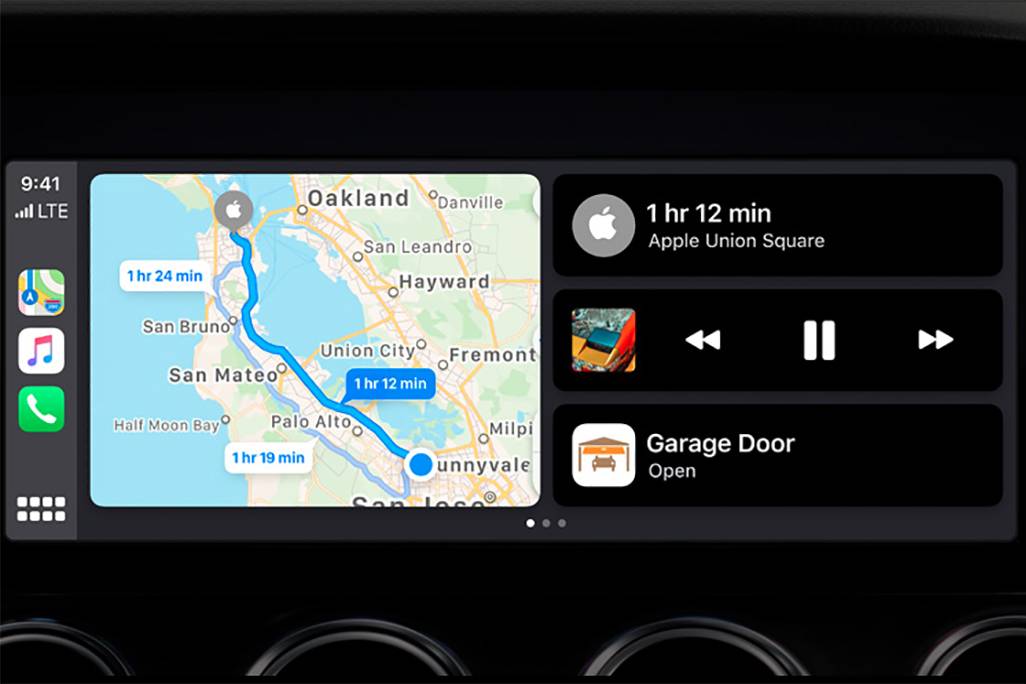
CarPlay Home Screen
Recently the Google maps have been updated to the latest version and they received a new option, now they can be launched on the CarPlay home screen which is divided in to 2 parts, before that there was able to use Apple maps only at that way. This is super comfy tool. Pls look at the pic. below
https://images.cars.com/cldstatic/wp-content/uploads/New-Apple-CarPlay-dashboard-view-Apple.jpg2 votesGreat news! Waze is now available on CarPlay Dashboard. Thanks for your suggestion.
-
CarPlay + Waze / Cluster Turn-by-turn not showing like it does on Android Auto
When using Waze with CarPlay on a vehicle with turn by turn display on cluster, the Waze don't show any direction, while Android Auto display a full direction.
The car in question is a 2024 GWM Ora 03, but the same happens on a 2023 BMW 320i.
Also, I don't know if this specific Cluster/CarPlay API is available for other apps, but this only works using Apple Maps. Waze or Google Maps doesn't show any direction on the cluster while using Apple car Play.
8 votes -
Please, remove this new feature that gives me PTSD from Google maps, where you have to tell us to go straight first, then turn left or right
Please, remove this new feature that gives me PTSD from Google maps, where you have to tell us to go straight first, then turn left or right, like obviously! It's so confusing and I've lost my way a couple times with this new update. It was more straightforward the way it was before.
1 vote -
Floating window on exit
Would like Waze to implement "floating" window on exit. Or atleast have pop up notification of the next direction, like Google maps has. When I close out Waze, I have no way of knowing the next step unless I reopen app.
9 votes


- Don't see your idea?