
Waze Suggestion Box
- There’s power in numbers! Search through existing suggestions to see if there's someone else with a similar idea and upvote it.
- You can build upon an idea -- simply comment below your fellow Wazer's submission.
- This forum is intended for user feedback and ideas. If you have an issue which needs support, please visit our help center.
- Any comments, feedback, ideas, reports, suggestions, or other information you provide to Waze (part of Google LLC) about Waze products and services (collectively “Feedback”) is not part of your personal data.
- You agree not to disclose, in your Feedback, to Waze any information, such as third-party information, that you are obligated to maintain as confidential.
- Waze has no obligation to use your Feedback.
- By submitting your Feedback in this page, you acknowledge that you are of the minimum age required to provide data processing consent in the applicable country where you are located and that you provide permission to Waze, and its affiliates, to use your Feedback and any information that personally identifies you to improve Waze’s current and future products and services in accordance with Waze's Privacy Policy (waze.com/legal/privacy).
- Please avoid providing any personal information in your Feedback.
- Providing a name, when submitting Feedback, is optional. If you choose to provide your name, it will be publicly displayed in this forum next to your Feedback. You can delete your name and provide your Feedback as an anonymous user at any time.
- or
2370 results found
-
Speed limit indication on map
I would be nice to have the speed limit on the map.
3 votesThank you for your suggestion! As you may know, Waze already displays a speedometer, including both your driving speed and the speed limit for the road you’re currently on.
-
More obnoxious speed limit warning
Sound when exceeding speed limit by set amount is a great option, but very easy to miss the warning. Instead of a short beep, Please add an option to select the sound, option to repeat sound until under set speed overage, and a flashing screen or other obnoxious ongoing visual warning. This would have saved me a ticket and be very beneficial as no other app does this.
56 votes -
Audible warning for speed cameras even if you're under the speed limit
If you're going under the speed limit you don't get an audible warning for a speed camera. If the camera is after a limit change you may be under the limit when approaching but you can then accelerate above the limit and have no warning.
10 votes -
Speed limit correction where it's wrong.
Please add option to change or at least mark where speed limits is incorrect. In "what do you see" -> Wrong speed limit. and then Please select what is the correct speed limit.
3 votes -
Disable Speed Limit Warning Beep
THIS IS DRIVING ME CRAZY !!
I almost deleted Waze from my iPhone - instead just disable bluetooth on my phone - which kills hands-free phone which is NOT ACCEPTABLE either
You simply MUST MUST MUST make it possible for the user to DISABLE the DAMM SPEED LIMIT CHIRP
This thing goes off 10 times in a 5-mile local stretch of road, interrupting radio and other media playing on the audio system.
My Escort 360 keeps me well appraised of the limits, as does Waze with the red speed limit circle. Wazers deserve the option to NOT BE OVERLOADED…3 votes -
Change speed limit during raod works
Being able to change a road/street max speed/speed limit during road works
ex : road works for 1 month, speed limit changed from 70 kmh to 50 kmh during that time and waze doesn't "beep" when you exceed it... this is problematic when there's a mobile radar.5 votes -
Speed limit sometimes covers current speed
Currently when I rapidly accelerate, like when passing on a 2 lane road, the speedlimit box becomes larger and covers my current speed indicator. And this is usually when I need to know my current speed the most! Please put an option to disable this behavior. I want to keep current speed limit and current speed on screen at all times, do not make the speedlimit cover up my current speed at any time.
Thank you.
4 votes -
Speed limit/Speedometer
Recent change to the speed limit sign being pushed to the right vs being on the lower left is not working. I have to search for it. Also any alerts covers up the speed icon. Also the left hand part of the screen is useless as everything pushed to the right. In busy traffic conditions this can be dangerous.
5 votes -
Speed limit notification
I would suggest adding the actual speed limit value notification when Waze reports there is a speed camera on your route.
1 vote -
Location of the Speed Limit and Speed on Android Auto
For Australian users, I would like to see the Speed Limit and Speedometer shown on the left of the map. This is because it is covered by our left hand when holding the steering wheel, because the driver sits on the right hand side of the vehicle. I cannot see either the speed limit or speedometer without moving my hand off the wheel.
2 votes -
Awards for People for Driving the Speed Limit
Many people drive above the speed limit and we've all got a speeding ticket at one time, but wouldn't it be cool to get rewarded when we do drive at or near the speed limit? Maybe waze can create a feature to award points based on how much time or mileage that we are compliant to the posted speed limit. And maybe even leverage companies like Starbucks to award good drivers with a coffee! It is especially critical that drivers obey the limit on residential streets, and maybe this could motivate and educate drivers to…
24 votes -
Transitioning into a new speed limit area.
Kindly include a prompt that notifies you when you're transitioning into a new speed limit area. Let the user choose if they would like to be notified if a new speed limit zone has been entered.
7 votes -
Swap the speed limit & notifications on the map
Swap the speed limit & notifications on the map. The speed limit should be in the circle (opaque) and actual speed in the b&w box. Reading the circle is difficult for actual speed.
6 votes -
Speedometer speeding threshold alert below speed limit
I currently have a blackbox installed in my car for insurance purposes. I would like to be able to set my speedometer alert BELOW the speed limit so I know I am approaching it and DONT GO OVER the limit. The options now are all ABOVE the limit.
12 votes -
Ability to change road speed limit
Around schools and some residential roads the speed limit is 20mph, map still shows old 30mph speed limit
2 votesThanks for contacting us about reporting an error on the map. Our community of volunteer map editors handle all changes to the Waze map.
To report a map issue in the Waze App
To report an issue on the Waze Live Map
To suggest an edit to the map-editing community
Note that it may take some time for them to review your request.
-
UI Problem: Speed camera\police alert covers the speed limit
I was using Waze in horizontal mode last night - the speed limit and my current speed were displayed near the bottom of the screen in the middle horizontally. I noticed that when alerts such as Police ahead or Speed Camera in x feet were displayed the notification box covers key bits of the screen such as your current speed, the speed limit and your precise location.
I think either the UI needs to shift up when the alerts are displayed, or the alert box needs to be constrained to one side of the screen.
I did take a…
3 votes -
Display speed limit on Radars
Showing the pop-up when approaching a radar, show the speed limit assigned to the radar.
2 votesThank you for your suggestion!
This suggestion will not be implemented for the time being, since we’re focuing on features which would potentially benefit larger groups of Wazers.
Stay tuned for more features and updates on Waze’s social pages on Facebook and Instagram -
Verbally Say Speed Limit on Road
Waze needs to say what the speed limit is on the road verbally. It is dangerous to look down at the phone screen for the speed limit when it is not posted on the road, and you have no idea what it is, especially for those who have difficulty reading small print.
7 votes -
current speed limit
Post the current speed limit when using the speedometer feature.
Afficher la vitesse max à ne pas dépasser.1 voteThank you for your suggestion! As you may know, Waze already displays a speedometer, including both your driving speed and the speed limit for the road you’re currently on.
-
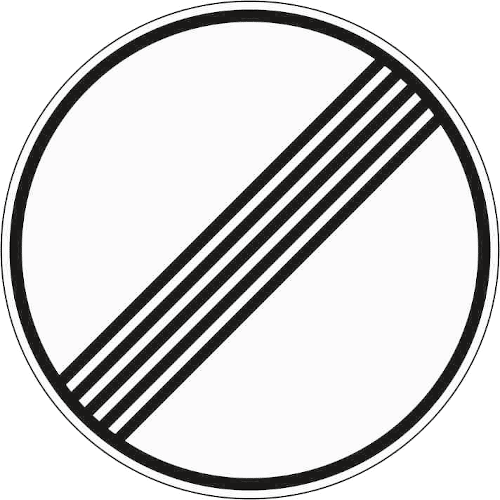
Add "unlimited speed limit" sign for Germany
In Germany, 70% of the highways have to actual speed limit. This is currently idicated by no speed limit sign at all. However, this might also mean that the speed limit is unknown.
Instead, the "unlimited" speed sign could be used that is used in Germany to indicate that no speed limit applies anymore (link to an image: https://www.bussgeldkatalog.org/wp-content/uploads/282.png) This is sign 282.This could be easily accomplished by either adding a checkbox to the editor to set that no speed limit applies, but this might requite some engineering.
An easier solution would be to only…3 votes


- Don't see your idea?