
Waze Suggestion Box
- There’s power in numbers! Search through existing suggestions to see if there's someone else with a similar idea and upvote it.
- You can build upon an idea -- simply comment below your fellow Wazer's submission.
- This forum is intended for user feedback and ideas. If you have an issue which needs support, please visit our help center.
- Any comments, feedback, ideas, reports, suggestions, or other information you provide to Waze (part of Google LLC) about Waze products and services (collectively “Feedback”) is not part of your personal data.
- You agree not to disclose, in your Feedback, to Waze any information, such as third-party information, that you are obligated to maintain as confidential.
- Waze has no obligation to use your Feedback.
- By submitting your Feedback in this page, you acknowledge that you are of the minimum age required to provide data processing consent in the applicable country where you are located and that you provide permission to Waze, and its affiliates, to use your Feedback and any information that personally identifies you to improve Waze’s current and future products and services in accordance with Waze's Privacy Policy (waze.com/legal/privacy).
- Please avoid providing any personal information in your Feedback.
- Providing a name, when submitting Feedback, is optional. If you choose to provide your name, it will be publicly displayed in this forum next to your Feedback. You can delete your name and provide your Feedback as an anonymous user at any time.
- or
4499 results found
-
Speed limit notification
I would suggest adding the actual speed limit value notification when Waze reports there is a speed camera on your route.
1 vote -
Speed traps notifications
Early notifications about speed traps inform you whenever you are in the area of the speed trap.
But now, if you are entering the speed trap area at the allowed speed, they don’t inform you about it, even if you are entered at the allowed speed, but increase your speed in this area.8 votes -
Verbally Say Speed Limit on Road
Waze needs to say what the speed limit is on the road verbally. It is dangerous to look down at the phone screen for the speed limit when it is not posted on the road, and you have no idea what it is, especially for those who have difficulty reading small print.
7 votes -
Ability to change road speed limit
Around schools and some residential roads the speed limit is 20mph, map still shows old 30mph speed limit
3 votesThanks for contacting us about reporting an error on the map. Our community of volunteer map editors handle all changes to the Waze map.
To report a map issue in the Waze App
To report an issue on the Waze Live Map
To suggest an edit to the map-editing community
Note that it may take some time for them to review your request.
-
Estimating the time to pass tunnels using average speed
When Waze suggests a path with a tunnel, the estimation time is always incorrect, and I cannot conclude that this is the best route. For example, if the time to pass a tunnel without traffic is 2 min and I pass it in 10 min (because of traffic), then after I came out of the tunnel, the estimation time become +8 min. I think Waze uses instantaneous velocity and GPS location to estimate traffic. In tunnels, GPS doesn't work (and many of tunnels don't have beacons), so Waze does not compute traffic in tunnels. This issue can be easily fixed…
4 votes -
Speed history
Keep speed history for past 90 days. Ability to sort it by dates or trips and map view. Log speed even when not navigating. Give user the ability to turn this feature on. This is useful when getting pulled over or camera ticket. This feature can be a expanded Google Maps "your timeline" with pin point speed history.
8 votes -
Average speed zone label covers up the speed limit
When you enter an average speed zone, the green bar on the left appears. Also a label appears at the bottom showing what distance the zone covers. Annoyingly this label covers up the current speed limit badge, so you can't see what the limit is until the label disappears or moves up far enough.
4 votes -
UI Problem: Speed camera\police alert covers the speed limit
I was using Waze in horizontal mode last night - the speed limit and my current speed were displayed near the bottom of the screen in the middle horizontally. I noticed that when alerts such as Police ahead or Speed Camera in x feet were displayed the notification box covers key bits of the screen such as your current speed, the speed limit and your precise location.
I think either the UI needs to shift up when the alerts are displayed, or the alert box needs to be constrained to one side of the screen.
I did take a…
3 votes -
speed limit manual
can we have a manual speed limit? I often use a big trailer who is limit to 90km/h on highway versus 130km/h for the cars. so my arrived hour is always very wrong and my route isn't optimized at all.
4 votes -
Display speed limit on Radars
Showing the pop-up when approaching a radar, show the speed limit assigned to the radar.
2 votesThank you for your suggestion!
This suggestion will not be implemented for the time being, since we’re focuing on features which would potentially benefit larger groups of Wazers.
Stay tuned for more features and updates on Waze’s social pages on Facebook and Instagram -
Historical Speed Trap Zones
Gather police present reports from drivers and develop a warning for areas on roads where police usually set up speed traps. Create a speed trap button for user input.
15 votes -
Speed bump notification
Please can you make speed bumps in a different category so it can be turned off without removing the rest of the hazards. Living in London means I get a speed bump notification every 5 seconds and it’s very distracting when driving. Thanks, Josh
21 votes -
Adding a maximum speed for adapting maximal speed roads
Hi,
In Belgium and the Netherlands (and probably other countries too) we have adapting maximal speed signs on the highroads (and on soms other roads too). In case of trafficjams or accidents they lower the maximum speed on that road so you don’t get extra accidents and jamms (other people that go faster and slower on the highway etc).
It would be handy to have a button on the ‘report screen’ to set a new (temporary) maximum speed for that segment while you are in your car so that other people can see it, your maximum speed is properly indicated…
9 votes -
I would like to see the speed limit in addition to my speed.
Have users post speed limit signs.
3 votes -
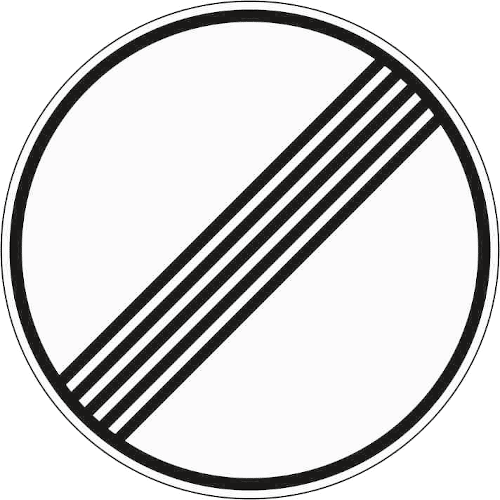
Add "unlimited speed limit" sign for Germany
In Germany, 70% of the highways have to actual speed limit. This is currently idicated by no speed limit sign at all. However, this might also mean that the speed limit is unknown.
Instead, the "unlimited" speed sign could be used that is used in Germany to indicate that no speed limit applies anymore (link to an image: https://www.bussgeldkatalog.org/wp-content/uploads/282.png) This is sign 282.This could be easily accomplished by either adding a checkbox to the editor to set that no speed limit applies, but this might requite some engineering.
An easier solution would be to only update the app…3 votes -
Posted speed trap alert
Many streets have built-in speed traps. You know -- the speed is 40 mph, and is a sensible speed for that road, but then for no reason it drops to 25 mph for a half-mile (and there's no school, residences, sharp turns, etc in the road). These are all about revenue generation for the local municipality, and not about road safety.
I would like to be able to report a posted speed trap on the map (and the map should be able to identify many candidates for potential posted speed traps), and then after Waze through some TBD process determines…
4 votes -
Speed camaras and speed bumbs
Your new icon for speed cameras is not very visible, it is too small and the blue colour is exactly as the route ahead when you are following a route on dark mode, night mode. It does not really help at all.
Your speed bumps alert is too much and very annoying, in London every single street, road has speed bumps, nearly all of them. I don't see the point in alerting about it so often and repeatedly all the time. The speed bumbs icon it more visible and alerting in size and colours than the speed cameras icon…2 votes -
Speed cameras / radars notifications on iOS CarPlay only over speed limit.
Hi there,
I live in Dubai, where you can go up to 20km/h over the speed limit before the speed camera / radar actually jumps. There is a speed camera / radar each kilometer, so the amount of alerts you get on the CarPlay display is HUGE.
Also, I saw that you can configure Waze to inform about the speed limit on different speeds and level, like "+5km/h" or similar.
I would like to suggest the same regarding the speed camera / radar alerts, as I want to get informed but only when / if I go over a…
1 vote -
Put current speed on CarPlay Waze
CarPlay Waze is missing the current speed that appears on iPhone only Waze. Please put the current speed on either the iPhone screen or CarPlay screen. Thanks
52 votes -
Speed Limit in Dubai
Basically in Dubai there is a +20km speed limit. In waze it shows that I’m going too fast. Speed camera light is distracting
1 vote


- Don't see your idea?