
Waze Suggestion Box
- There’s power in numbers! Search through existing suggestions to see if there's someone else with a similar idea and upvote it.
- You can build upon an idea -- simply comment below your fellow Wazer's submission.
- This forum is intended for user feedback and ideas. If you have an issue which needs support, please visit our help center.
- Any comments, feedback, ideas, reports, suggestions, or other information you provide to Waze (part of Google LLC) about Waze products and services (collectively “Feedback”) is not part of your personal data.
- You agree not to disclose, in your Feedback, to Waze any information, such as third-party information, that you are obligated to maintain as confidential.
- Waze has no obligation to use your Feedback.
- By submitting your Feedback in this page, you acknowledge that you are of the minimum age required to provide data processing consent in the applicable country where you are located and that you provide permission to Waze, and its affiliates, to use your Feedback and any information that personally identifies you to improve Waze’s current and future products and services in accordance with Waze's Privacy Policy (waze.com/legal/privacy).
- Please avoid providing any personal information in your Feedback.
- Providing a name, when submitting Feedback, is optional. If you choose to provide your name, it will be publicly displayed in this forum next to your Feedback. You can delete your name and provide your Feedback as an anonymous user at any time.
- or
1572 results found
-
"Known for having speed traps"
There are some places, at least in Portugal, that are known for having speed traps occasionally, and, given there's no warning for those speed traps, it would be useful for newcomers
3 votesThanks for contacting us about reporting an error on the map. Our community of volunteer map editors handle all changes to the Waze map.
To report a map issue in the Waze App
To report an issue on the Waze Live Map
To suggest an edit to the map-editing community
Note that it may take some time for them to review your request.
-
Speed limit notification
I would suggest adding the actual speed limit value notification when Waze reports there is a speed camera on your route.
1 vote -
Fix speed icons size and location on screen.
Speed icons are way too small to see. Countries that drive on right side move icons to left side of screen. Know problem for years. Please fix.
11 votes -
Display speed limit on Radars
Showing the pop-up when approaching a radar, show the speed limit assigned to the radar.
2 votesThank you for your suggestion!
This suggestion will not be implemented for the time being, since we’re focuing on features which would potentially benefit larger groups of Wazers.
Stay tuned for more features and updates on Waze’s social pages on Facebook and Instagram -
speed display on map
My device is an apple iphone 17 useing carplay in a 2018 VOLVO XC60, something changed in the last month and now the waze menu is on the right hand side and covers the speed from GPS.
The Menu used to br on the left side with the settings on the lower rif
ght side and speed was always available. Hope you can rectify because the speed reading is very important to me
Brian.3 votes -
Say slow down when speeding
Say "slow down" when speeding above the set threshold instead of a single beep
2 votes -
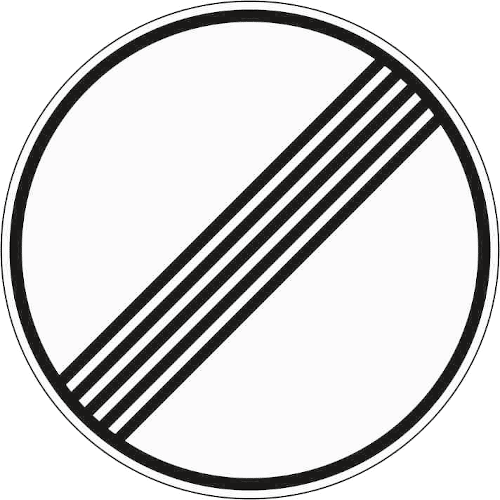
Add "unlimited speed limit" sign for Germany
In Germany, 70% of the highways have to actual speed limit. This is currently idicated by no speed limit sign at all. However, this might also mean that the speed limit is unknown.
Instead, the "unlimited" speed sign could be used that is used in Germany to indicate that no speed limit applies anymore (link to an image: https://www.bussgeldkatalog.org/wp-content/uploads/282.png) This is sign 282.This could be easily accomplished by either adding a checkbox to the editor to set that no speed limit applies, but this might requite some engineering.
An easier solution would be to only update the app…3 votes -
Show speed limit ahead (e.g. 300 meters ahead) for economic driving
In order to allow economic driving one should be informed that a changing speed limit will come up long enough to be able to save fuel and save the environment. When there is a hint that you have to lower speed like 300 meters in advance you can just stop pushing gas, so car will just sail.
12 votes -
Please provide an option were we can report new speed cameras or temporary cameras
Please provide an option were we can report new speed cameras or temporary cameras
55 votes -
Speed limit update or entrance
I know there were problems with people submitting to many cases of speed limits. Such as 50 mph areas. I think it would be a great idea to bring it back but only for 70-75 mph areas! There's a lot of times I'm on the road and expect Waze to have the speed limit and miss the sign and have no idea.. I think this would be a great improvement for the users and there shouldn't be a ton of incidents to check out like used to!
2 votes -
Is there a feature that can be built into the Waze app that will alert you to an upcoming speed change
Could Waze build an alert into its app to alert you to an upcoming speed change, to help you decrease your speed. it would help to keep you from exceeding the speed limit.
61 votes -
Make the Alert Button and Speed Display floating
English: Make the Alert Button and Speed Display floating, so the driver can position them on the screen in order to be more visible regardless of the position of the cell phone on the panel.
Portugues: Fazer o Botão de Alerta e o Mostrador de velocidade flutuantes, assim o motorista pode posiciona-los na tela de forma a ser mais visivel independente da posição do telefone celular no painel.
108 votes -
Please let us have the option to show ONLY the speed limit sign.
Please let us have the option to show ONLY the speed limit sign when using with an Android Auto car or stereo unit. Currently, it shows both or only the speedometer with the speed limit sign too small to see easily. When I first start up and I'm parked on a street that has a speed limit, the sign is nice and big. Once moving though, the speedometer shows up and the limit sign shrinks down to where it's hard to see.
20 votes -
Speed bumps alert option
I suggest to adding the "speed bump" alert inform option, too. Today we can't inform it. There's just the voice alert, but not the option to inform one.
4 votes -
Location of the Speed Limit and Speed on Android Auto
For Australian users, I would like to see the Speed Limit and Speedometer shown on the left of the map. This is because it is covered by our left hand when holding the steering wheel, because the driver sits on the right hand side of the vehicle. I cannot see either the speed limit or speedometer without moving my hand off the wheel.
3 votes -
Speed cameras / radars notifications on iOS CarPlay only over speed limit.
Hi there,
I live in Dubai, where you can go up to 20km/h over the speed limit before the speed camera / radar actually jumps. There is a speed camera / radar each kilometer, so the amount of alerts you get on the CarPlay display is HUGE.
Also, I saw that you can configure Waze to inform about the speed limit on different speeds and level, like "+5km/h" or similar.
I would like to suggest the same regarding the speed camera / radar alerts, as I want to get informed but only when / if I go over a…
1 vote -
Seperate speed limit warning for each vehicle type
Hi Waze team,
I have used Waze while driving motorcycle. But in my opinion, it would be good if we can separate the speed limit for each vehicle type because the speed limit may be different with cars on some roads. Maybe it's a good development route for supporting another type of vehicle like truck for example9 votes -
Overview of speed controls
Show an overview of all speed controls that you had on your way with for each control the speed limit and users speed at the moment of passing the control. Including the section controls as well, showing the speed limit and users average speed during the section control. So the user can see all the controls he had and were he drove above the speed limit (and so risks to receive a fine).
1 vote -
speed improving
Hello!
We use the product https://www.waze.com and we like it, but noticed,
the site slows down due to maps and scripts. (link and skrin are added). There are large libraries that greatly slow down page loading (https://embed.waze.com/livemap/assets/vendor-f90e3789d81b39390076.js) Tell me, please, are you planning to improve the project in terms of download speed?
Let me tell about our good practice with speed up the site. After changing the image format from .png to .webp, the download speed increased. Perhabs, you can use that on you project.Best regards, Sergey Gook, CEO Evakyator.by
https://evakyator.by/probki - page, which use iframe
…
1 vote -
Tolls and Traffic Speed Bumps
I would like to be able to set/unset alarms regarding Toll and Traffic Speed Bumps
3 votes


- Don't see your idea?