
Waze Suggestion Box
- There’s power in numbers! Search through existing suggestions to see if there's someone else with a similar idea and upvote it.
- You can build upon an idea -- simply comment below your fellow Wazer's submission.
- This forum is intended for user feedback and ideas. If you have an issue which needs support, please visit our help center.
- Any comments, feedback, ideas, reports, suggestions, or other information you provide to Waze (part of Google LLC) about Waze products and services (collectively “Feedback”) is not part of your personal data.
- You agree not to disclose, in your Feedback, to Waze any information, such as third-party information, that you are obligated to maintain as confidential.
- Waze has no obligation to use your Feedback.
- By submitting your Feedback in this page, you acknowledge that you are of the minimum age required to provide data processing consent in the applicable country where you are located and that you provide permission to Waze, and its affiliates, to use your Feedback and any information that personally identifies you to improve Waze’s current and future products and services in accordance with Waze's Privacy Policy (waze.com/legal/privacy).
- Please avoid providing any personal information in your Feedback.
- Providing a name, when submitting Feedback, is optional. If you choose to provide your name, it will be publicly displayed in this forum next to your Feedback. You can delete your name and provide your Feedback as an anonymous user at any time.
- or
543 results found
-
Interface suggestion
When asking if police or disabled car on side of the road, perhaps separate the “still there” and “not there” buttons. Perhaps one on the top and one on the bottom. Sometimes I accidentally click the wrong button as the car is bumpy and the buttons are too close together. FYI. This is on Apple CarPlay.
22 votes -
Hi! Could you please add a TONE or BIP when the car is near the Speed Limit. This way, I don´t need to watch the APP. Best Regards
Hi! Could you please add a TONE or BIP when the car is near the Speed Limit. This way, I don´t need to watch the APP. Best Regards
1 vote -
Exit number
The exit numbers have disappeared on Waze for Apple CarPlay. Please put it back
5 votes -
Auto hide top navigation bar in CarPlay
When not on an active route in CarPlay allow the top navigation bar to be hidden like happens in Google Maps and Apple Maps
3 votes -
Please address the issue where Waze no longer gives driving instructions on HUD units via Android Auto and Apple CarPlay
As the topic suggests
12 votes -
use Iphone screen to display speedometer/speed limit when in carpay mode
When in apple carplay mode, use the iphone screen to display the speedometer/speedlimit in full screen. Pehaps as a third tab next to the directions, notifications tab. With the phone in a cradle close to the steering wheel this avoids having to glance to the far right of the main car screen to see the actual speed limit.
8 votes -
Flash screen or show some form of Visual alert (Maybe flash the screen white and black 3 times?), when you have audio alerts muted
Flash screen or show some form of Visual alert (Maybe flash the screen white and black 3 times?) that would catch the drivers eye, when you have audio alerts muted? I mute mine as it causes my music to go quiet when an alert happens. (Apple CarePlay). A distinctive total screen flash might catch my peripheral vision, "Police ahead".
11 votes -
Apple Carplay waze en google maps
Het zou goed zijn om te weten in welke straat we aan het rijden zijn doormiddel van een apparte vak te tonen !
Ook zou het leuk zijn om te weten wat de volgende afslag wordt en welke de volgende straat is en of kruising !
Het tonen van verkeersborden zou ook Ideaal zijn ( eenrichtingsverkeer, verbod om in te halen, voorrangsweg, ... etc ) !
1 vote -
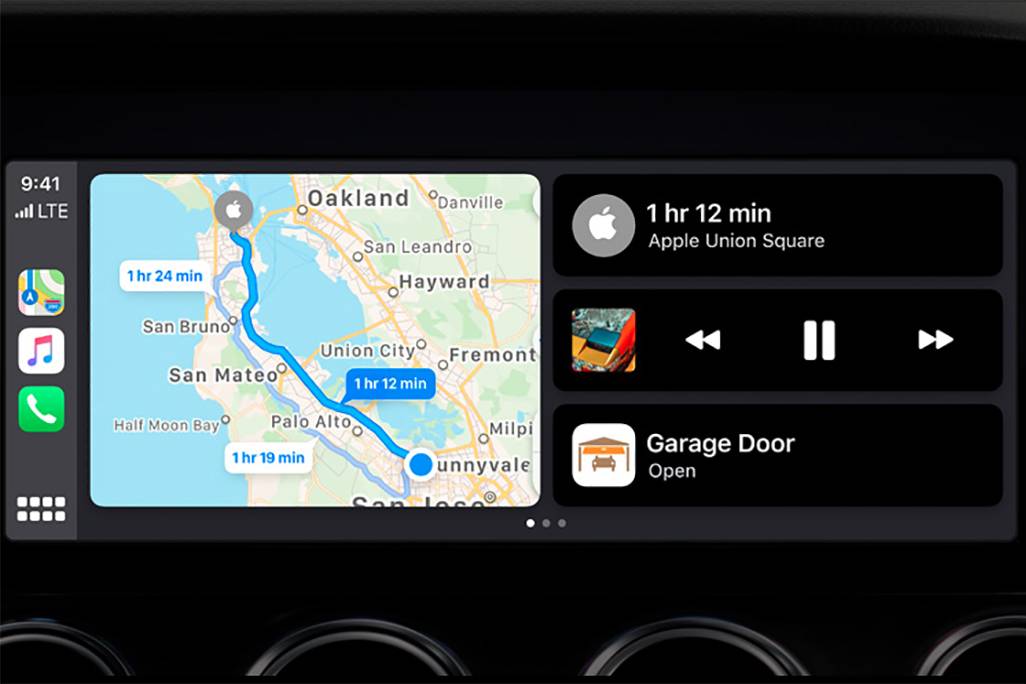
CarPlay Home Screen
Recently the Google maps have been updated to the latest version and they received a new option, now they can be launched on the CarPlay home screen which is divided in to 2 parts, before that there was able to use Apple maps only at that way. This is super comfy tool. Pls look at the pic. below
https://images.cars.com/cldstatic/wp-content/uploads/New-Apple-CarPlay-dashboard-view-Apple.jpg2 votesGreat news! Waze is now available on CarPlay Dashboard. Thanks for your suggestion.
-
Waze está teniendo graves problemas con Apple CarPlay
Se bloquea CarPlay frecuentemente con Waze. Cuando se conecta mi IPhone a mi auto, nunca muestra correctamente el mapa, siempre debo cerrar Waze y reiniciarlo para que funcione.
Por otro lado, últimamente muestra rutas más largas o con más tráfico. Se ha vuelto muy impreciso, cuando antes era fenomenal en este aspecto2 votesThanks for reaching out. Please note this platform is dedicated to ideas and suggestions for the Waze app. If your idea is for a Community platform like the Waze Map Editor, please submit it through the Community forum. If you need help using Waze, please click here to reach the "Waze support" page.
-
Fix android automotive - Apple car play Waze map disappearing on center wheel screen if not on tablet
Fix android automotive - Apple car play Waze map disappearing on center wheel screen if not on tablet
Only Google map is working, and not as great yet as Waze for EV except EV recharge calculations and suggestion.
This is really annoying, from security perspective, wish to switch radio, on tablet, map disappear on cwnterwheel display.
Constantly have to get back to tablet radio, change station, back to CarPlay, Waze, reset center wheel console to display Google map.
Worst if you select Google map, it disable automatically Waze on tablet and cancel trip.
Make it work or keep independent.
Been…1 vote -
Localized Highway Shields (State & County Routes, etc)
In the U.S., each state has its own highway route number shield. Some states, like West Virginia, also have county route shields that differ from the state route shields. In Pennsylvania, a route like Route 28 would show the Keystone with a 28 on top of it.
A lot of effort is taken in WME to ensure the road names and turn-by-turn instructions match signage. Drivers would benefit by having the same highway shields in their Waze app as they will see on the highway signage as they drive.
Apple has already included this in Apple Maps. It should be…
6 votesGreat thinking! The issue you raised has been addressed in a recent redesign. Hope you like it!
-
Innovative collision warning system for Waze
Here's an award-winning innovation to reduce road accidents and anticipate traffic conjestion: https://www.youtube.com/watch?v=7Tws6tho924. As Waze already uses GPS and connects drivers in real-time, the integration of this collision warning system will be groundbreaking for Waze. What do you say?
8 votes -
A search bar for Apple CarPlay / android auto (Google maps have it)
Need a search addresses for Carplay / android auto (Google maps have the feature in carplay.
4 votes -
CarPlay + Waze / Cluster Turn-by-turn not showing like it does on Android Auto
When using Waze with CarPlay on a vehicle with turn by turn display on cluster, the Waze don't show any direction, while Android Auto display a full direction.
The car in question is a 2024 GWM Ora 03, but the same happens on a 2023 BMW 320i.
Also, I don't know if this specific Cluster/CarPlay API is available for other apps, but this only works using Apple Maps. Waze or Google Maps doesn't show any direction on the cluster while using Apple car Play.
8 votes -
Truck Driver friendly
I would love to see a truck driver (class A and class B) friendly to where truck drivers can see height of bridges and the maximum weight capacity it holds. This would open up some much more interest for people and increase usage. My spouse hates google maps and Apple Maps because they never work for him he loves wazes but wishes it incorporates truck drivers. Please take this into consideration I would appreciate it so much thank you.
31 votes -
Show address in final navigation screen when approaching.
I LOVE that Waze now accesses my Apple calendar to see my appointments & the time. SO very helpful, as Waze is my go to map app (I am an on the road sales rep). But I have to exit Waze & return to my calendar entry to see the exact street address I am looking for. The final navigation screen will have the name & phone number of the person I'm trying to visit, but not the address, the most important part. Really annoying!
17 votes -
1 vote
Thanks for reaching out. Please note this platform is dedicated to ideas and suggestions for the Waze app. If your idea is for a Community platform like the Waze Map Editor, please submit it through the Community forum. If you need help using Waze, please click here to reach the "Waze support" page.
-
Honda civic Turn by Turn Navigation in Digital Cluster
Allow Turn by turn navigation to display in the Honda Civic digital cluster. Currently in the Si and Higher models while using CarPlay only Apple Maps offers this. When using Waze in my digital cluster, it just shows a compass
10 votes -
Set Waze as default iOS navigation app [iOS 18.4/EU only]
In the EU, Apple has finally made it possible to set a default navigation app in iOS 18.4.
Unfortunately, Waze has not yet implemented this feature.
You can find the new option in iOS 18.4 under Settings -> Apps -> Default apps -> Navigation
This is what it looks like: https://ibb.co/wNHBspGN
It would be really great to finally have the option on iOS to open addresses directly without having to copy and paste them manually into Waze, for example.
30 votes


- Don't see your idea?