
Waze Suggestion Box
- There’s power in numbers! Search through existing suggestions to see if there's someone else with a similar idea and upvote it.
- You can build upon an idea -- simply comment below your fellow Wazer's submission.
- This forum is intended for user feedback and ideas. If you have an issue which needs support, please visit our help center.
- Any comments, feedback, ideas, reports, suggestions, or other information you provide to Waze (part of Google LLC) about Waze products and services (collectively “Feedback”) is not part of your personal data.
- You agree not to disclose, in your Feedback, to Waze any information, such as third-party information, that you are obligated to maintain as confidential.
- Waze has no obligation to use your Feedback.
- By submitting your Feedback in this page, you acknowledge that you are of the minimum age required to provide data processing consent in the applicable country where you are located and that you provide permission to Waze, and its affiliates, to use your Feedback and any information that personally identifies you to improve Waze’s current and future products and services in accordance with Waze's Privacy Policy (waze.com/legal/privacy).
- Please avoid providing any personal information in your Feedback.
- Providing a name, when submitting Feedback, is optional. If you choose to provide your name, it will be publicly displayed in this forum next to your Feedback. You can delete your name and provide your Feedback as an anonymous user at any time.
- or
1600 results found
-
user provided layout themes
There are various requests for features of what Waze should/should not display on screen. It would be great if users could instead of just choosing a style, actually choose a (or create) a layout that another user has selected.
Best option would be to provide the ablity to give shapes, and areas that can contain text. Eg.
- Current speed (can then increase/decrease the speed display)
- Average wazer speed on the current segment (so the potential speed limits could be shown)
- Current road name
- Text/images for popups
- Destination ETA
- Destination time
- Destination name
-…8 votes -
Speed limit update or entrance
I know there were problems with people submitting to many cases of speed limits. Such as 50 mph areas. I think it would be a great idea to bring it back but only for 70-75 mph areas! There's a lot of times I'm on the road and expect Waze to have the speed limit and miss the sign and have no idea.. I think this would be a great improvement for the users and there shouldn't be a ton of incidents to check out like used to!
2 votes -
Make the Alert Button and Speed Display floating
English: Make the Alert Button and Speed Display floating, so the driver can position them on the screen in order to be more visible regardless of the position of the cell phone on the panel.
Portugues: Fazer o Botão de Alerta e o Mostrador de velocidade flutuantes, assim o motorista pode posiciona-los na tela de forma a ser mais visivel independente da posição do telefone celular no painel.
108 votes -
Speed Limit Correction | Help Improve Waze – Allow Speed Limit Feedback Again
I believe it would be very helpful to bring back the feature that allowed users to suggest corrections to the speed limit shown in the app. This function used to be available, and I would often use it to report inaccurate speed limits on certain roads. However, it was removed a few years ago, and there is currently no easy way to suggest corrections directly through the app.
Restoring this feature would greatly improve the accuracy of navigation and benefit all users by keeping speed limit data up to date. Please consider reintroducing this option within the app.
Thank you!
4 votes -
Speed bumps alert option
I suggest to adding the "speed bump" alert inform option, too. Today we can't inform it. There's just the voice alert, but not the option to inform one.
4 votes -
Speed alerts relevant to the vehicle driven
Hi could you make it possible to have a option to choose a van as a vehicle option? By selecting the vehicle as a car when driving a van makes the speed limit alerts incorrect. Thanks
13 votes -
Accurate speed
When using Apple Car Play, my speed is continuously 12+mph over what I am actually doing. I can use the app on my phone just fine it’s accurate within + or - 2mph. I am confused as to why my truck displays such a difference. Brand new truck, brand new iPhone. All updates to apps and devices as required.
1 voteThanks for reaching out. Please note this platform is dedicated to ideas and suggestions for the Waze app. If your idea is for a Community platform like the Waze Map Editor, please submit it through the Community forum. If you need help using Waze, please click here to reach the "Waze support" page.
-
U.K. Motorway Variable speed limits
Is there a way that Waze can receive an information feed of the U.K. motorway variable speed limits?
I am sure this must exist and have the ability to be tapped into.
The M25, is a great example, but there are many more motorways across the country, often have variable speed limits posted on signs above the lanes. These can change depending on the operators and in response to incidents or traffic conditions.
It would be incredibly useful to be able to see on the Waze screen what the current limit is, and to know that it is current.7 votes -
insufisant speed limit notification
Hello and Happy New Year to all.
It remains for me 2 major gaps for waze and one interesting improvement.
- The sound alert only when over speeding is insuffisant and already cost me 1pt on my licence when I accelerate to overtake. ..
You can not look at the screen constantly we must keep an eye on the road. Then configurable audible signal for danger zones is therefore indispensable.
- The speed is not displayed or set as she is known by the apk.For the improvement is to advertise only hazards on the road on which flows…
10 votes -
Can we get a known speed trap alert
Some areas are just known for speed traps. Maybe some kind of algorithm that logs how many drivers ping certain areas for speed traps for a period of time before its considered a "Known speed trap". This alert can be optional in carplay etc.
4 votes -
Fix speed icons size and location on screen.
Speed icons are way too small to see. Countries that drive on right side move icons to left side of screen. Know problem for years. Please fix.
11 votes -
Adding a function to display alternative vehicle speed limits ie van, towing etc
To be able to display the relevant speed limits on screen for varying vehicles ie a van or towing etc
78 votes -
drive the speed limit alerts when cutting through a neighborhood
Waze sends lots of drivers through my neighborhood when traffic is bad. Most drive over the speed limit and will even pass others who are driving the speed limit. Because you have demonstrated that you do not care about my neighborhood, except as a cut-through, please add a voice alert that will sound when people are using waze to cut through neighborhoods reminding people to drive the speed limit.
5 votes -
Customize Speed Limit Alert
Can you have a separate speed limit alert for highway vs regular streets or roads? For example maybe i am ok with 10 over on streets and 20 over on highways
4 votes -
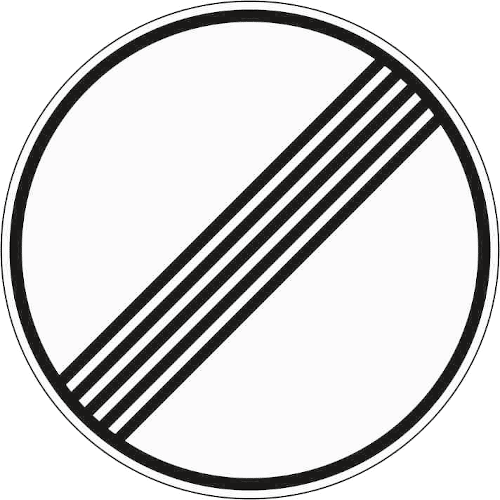
Add "unlimited speed limit" sign for Germany
In Germany, 70% of the highways have to actual speed limit. This is currently idicated by no speed limit sign at all. However, this might also mean that the speed limit is unknown.
Instead, the "unlimited" speed sign could be used that is used in Germany to indicate that no speed limit applies anymore (link to an image: https://www.bussgeldkatalog.org/wp-content/uploads/282.png) This is sign 282.This could be easily accomplished by either adding a checkbox to the editor to set that no speed limit applies, but this might requite some engineering.
An easier solution would be to only update the app…3 votes -
known speed trap
I'd like to see a feature where kind of like the known speed camera where a permanent feature that could help out of towners pinpoint speed traps. Especially late at night in rural area this would be helpful as traffic is probably much less and is less likely to be reported.
2 votes -
Custom Speed Alert threshold
I wish there was a way to set my speed alert at seven or eight or nine mph over the limit not just 5 or 10
3 votes -
Is there a feature that can be built into the Waze app that will alert you to an upcoming speed change
Could Waze build an alert into its app to alert you to an upcoming speed change, to help you decrease your speed. it would help to keep you from exceeding the speed limit.
61 votes -
Speed Limit & Notifications
It would be great if the App could tell you what the current speed limit is.
Also, if there was a way so that you can block out all notifications on your phone so as to not be distracted by texts, alarms, etc. while driving.
1 voteThank you for your suggestion! As you may know, Waze already displays a speedometer, including both your driving speed and the speed limit for the road you’re currently on.
-
Conditional speed zone
Where I am, and I'm sure many others, there are school and park zones that have different speeds for certain hours. It would be nice to have the ability to have speed zones that change according to the times.
3 votes


- Don't see your idea?