
Waze Suggestion Box
- There’s power in numbers! Search through existing suggestions to see if there's someone else with a similar idea and upvote it.
- You can build upon an idea -- simply comment below your fellow Wazer's submission.
- This forum is intended for user feedback and ideas. If you have an issue which needs support, please visit our help center.
- Any comments, feedback, ideas, reports, suggestions, or other information you provide to Waze (part of Google LLC) about Waze products and services (collectively “Feedback”) is not part of your personal data.
- You agree not to disclose, in your Feedback, to Waze any information, such as third-party information, that you are obligated to maintain as confidential.
- Waze has no obligation to use your Feedback.
- By submitting your Feedback in this page, you acknowledge that you are of the minimum age required to provide data processing consent in the applicable country where you are located and that you provide permission to Waze, and its affiliates, to use your Feedback and any information that personally identifies you to improve Waze’s current and future products and services in accordance with Waze's Privacy Policy (waze.com/legal/privacy).
- Please avoid providing any personal information in your Feedback.
- Providing a name, when submitting Feedback, is optional. If you choose to provide your name, it will be publicly displayed in this forum next to your Feedback. You can delete your name and provide your Feedback as an anonymous user at any time.
- or
441 results found
-
Show toll roads routes also in Car play
On the route options on iOS you see if a route option has a toll road, in Apple Car Play you don’t see this.
7 votes -
Speed trap notification on apple car play
It happened many times in for vehicles that two notifications of speed traps overlap each other blocking severe information of the app.
The only solution is to close the app and re-open it but soon it happens again, really annoying and makes the app impossible to use.
1 vote -
In apple car play, the "go now" feature gets stuck and you have to exit completely out of the map to get rid of it.
In apple car play, the "go now" feature gets stuck and you have to exit completely out of the map to get rid of it. The "go now" button won't work.
1 vote -
Waze seems to have great difficulty re-routing the driver if he makes a wrong turn. Apple Maps is much better in this respect.
If I miss a turn, Waze is so slow to reroute my trip that I have to quit Waze app, jump over to Apple Maps & Siri, get back on track, then telaunch Waze
1 vote -
Show Stop lights
Make viewing intersections with stop lights and option (show the stop light on the navigation). This is something Apple Maps has and it helps people anticipate turns and make less mistakes.
19 votes -
Please make the Waze app compatible with apple watches for turn by turn instructions.
Please make the Waze app compatible with Apple Watches for turn by turn instructions. Often times the drive times and traffic conditions are much better on Waze app and more up to date so i rely on for my daily commute but while driving it would be helpful to look on my watch or feel buzzes when I need to make turns rather than looking on my screen for directions. I've been an almost daily user of Waze for years and would love to see this integration
1 vote -
Exit number
The exit numbers have disappeared on Waze for Apple CarPlay. Please put it back
5 votes -
Hello. I think it would be good to have full functionally on Apple car play. It is rather when a road is closed you have to pull over. Unpll
There needs to be more functionality with Apple car play. It is very annoying when there is a closed road and I can’t get waze to re route without stopping. Pulling over, unplugging my phone and then reporting the road closed. I have also had a couple of annoying times where I have been unable to pave without having to jump through the same hoops.
3 votes -
Short Cut for reporting police
It would be super useful if you do what is necessary to allow people to create a short cut in apple short cut app for reporting police or other road incidents. It would be safer when using Apple CarPlay or your phone in being able perform that action quicker
3 votes -
Waze to replace maps in iOS13
Right now Waze is in carplay, but not integrated like apple maps is in iOS13. When will you be able to do that? It would be nice to have everything in one spot. Especially when using apple music. I understand that Apple has to let third parties, like youselves, in, but this is crazy. We the users should have the choice.
1 vote -
Auto sleep mode
Waze does not auto close after using Apple Car Play. Can it be set to go into sleep mode when exiting the vehicle?
7 votes -
Adding traffic lights and stop signs like how Apple Maps and I think google maps has.
Adding traffic lights and stop signs would be amazing, it’s nice to know 1 mile In advance when driving in new areas.
12 votes -
When I am using Apple car play there is nothing that tells me what address I am looking for when I get close to my destination.
When I am using Apple car play there is nothing that tells me what address I am looking for when I get close to my destination. And the address is not in my history.
1 vote -
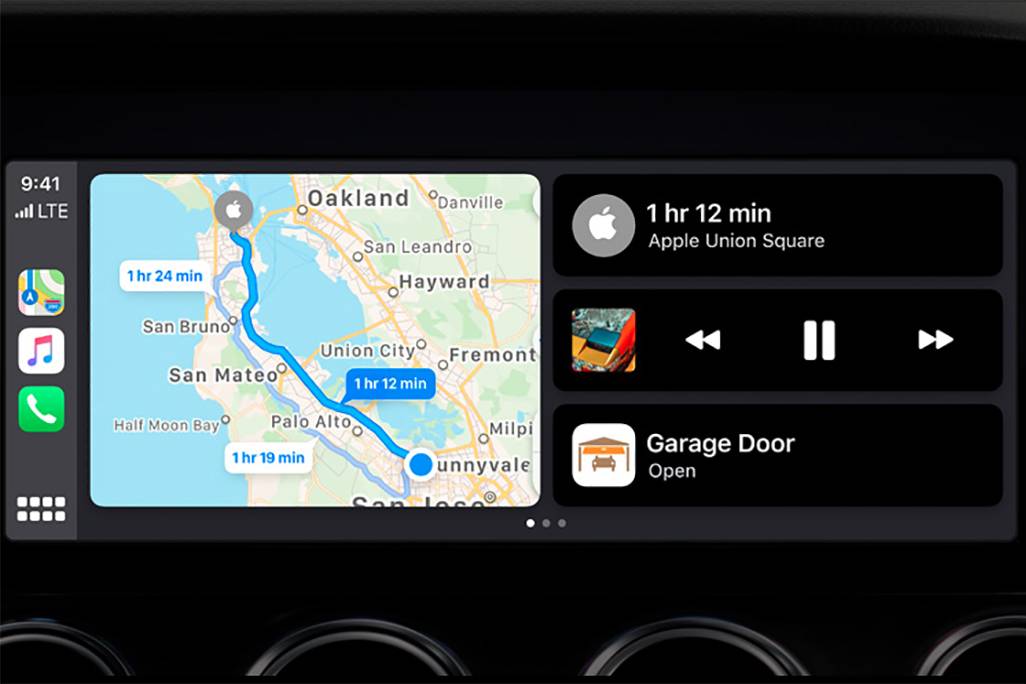
CarPlay Home Screen
Recently the Google maps have been updated to the latest version and they received a new option, now they can be launched on the CarPlay home screen which is divided in to 2 parts, before that there was able to use Apple maps only at that way. This is super comfy tool. Pls look at the pic. below
https://images.cars.com/cldstatic/wp-content/uploads/New-Apple-CarPlay-dashboard-view-Apple.jpg2 votesGreat news! Waze is now available on CarPlay Dashboard. Thanks for your suggestion.
-
Auto hide top navigation bar in CarPlay
When not on an active route in CarPlay allow the top navigation bar to be hidden like happens in Google Maps and Apple Maps
3 votes -
1 vote
-
A search bar for Apple CarPlay / android auto (Google maps have it)
Need a search addresses for Carplay / android auto (Google maps have the feature in carplay.
4 votes -
Adding a “Smart Location Clipboard” Feature to Waze on Apple CarPlay and Android Auto
Proposal: Adding a “Smart Location Clipboard” Feature to Waze on Apple CarPlay and Android Auto
Current Issue:
When using Waze through CarPlay or Android Auto, drivers and map editors cannot directly save or share a location from the Waze interface.
To save a location, the driver must:
1. Disconnect the phone from CarPlay/Android Auto.
2. Open Waze on the phone.
3. Select “Share location.”
4. Exit the app.
5. Paste the location into Notes or another app and manually add details.This process is complicated, distracting for the driver, and in some cases, can cause accidents.
Proposed Solution – “Smart…
2 votes -
About wazers real time and apple car play
Hi, I noticed that Wazers on the map appear stationary and don’t move, which makes the experience feel less realistic. I suggest updating the app to show their real-time movement for a better and more interactive experience. Thanks!
1 vote -
Let me rearrange hazard icons order how I want them.
Let me rearrange hazard icons how I want them. I live in Texas and road kill should be at the top of my hazard list. Make this option for Apple car play also.
8 votes


- Don't see your idea?