
Waze Suggestion Box
- There’s power in numbers! Search through existing suggestions to see if there's someone else with a similar idea and upvote it.
- You can build upon an idea -- simply comment below your fellow Wazer's submission.
- This forum is intended for user feedback and ideas. If you have an issue which needs support, please visit our help center.
- Any comments, feedback, ideas, reports, suggestions, or other information you provide to Waze (part of Google LLC) about Waze products and services (collectively “Feedback”) is not part of your personal data.
- You agree not to disclose, in your Feedback, to Waze any information, such as third-party information, that you are obligated to maintain as confidential.
- Waze has no obligation to use your Feedback.
- By submitting your Feedback in this page, you acknowledge that you are of the minimum age required to provide data processing consent in the applicable country where you are located and that you provide permission to Waze, and its affiliates, to use your Feedback and any information that personally identifies you to improve Waze’s current and future products and services in accordance with Waze's Privacy Policy (waze.com/legal/privacy).
- Please avoid providing any personal information in your Feedback.
- Providing a name, when submitting Feedback, is optional. If you choose to provide your name, it will be publicly displayed in this forum next to your Feedback. You can delete your name and provide your Feedback as an anonymous user at any time.
- or
3256 results found
-
current speed limit
Post the current speed limit when using the speedometer feature.
Afficher la vitesse max à ne pas dépasser.1 voteThank you for your suggestion! As you may know, Waze already displays a speedometer, including both your driving speed and the speed limit for the road you’re currently on.
-
Speedometer position Android Auto
Actual Speed and Limit icons to be set closer to driver position (left or right of screen) depending on driver position in settings.
On car displays having the icons on opposite side can take the attention off the road for too long when trying to observe the speed limit / actual speed.13 votes -
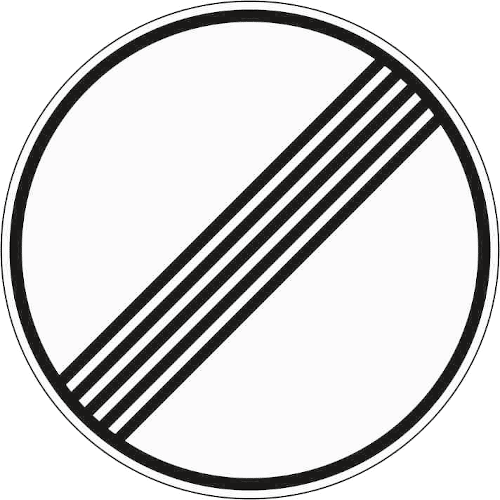
Add "unlimited speed limit" sign for Germany
In Germany, 70% of the highways have to actual speed limit. This is currently idicated by no speed limit sign at all. However, this might also mean that the speed limit is unknown.
Instead, the "unlimited" speed sign could be used that is used in Germany to indicate that no speed limit applies anymore (link to an image: https://www.bussgeldkatalog.org/wp-content/uploads/282.png) This is sign 282.This could be easily accomplished by either adding a checkbox to the editor to set that no speed limit applies, but this might requite some engineering.
An easier solution would be to only…3 votes -
Using Waze with Android Auto and large screens, it
Using Waze with Android Auto and large screens, The button to choose between different routes is far away from the driver. This causes the gaze to be diverted from the road in an attempt to locate the button while reaching out a hand away from the steering wheel. I suggest placing the knob close to the driver's seat
1 vote -
The speed trap alert sound should consider the speed limit of the trap
The speed trap alert sound should consider the speed limit of the camera and not the current road the driver is on.
In situations where the driver is on a fast road and is about to exit to a slower road with a speed trap, the driver does not receive the sound alert as they should if they were already on the road with the camera.
For example: A driver is driving at 90 km/h on a road with a speed limit of 100 km/h, following a route already indicated on Waze. The driver is going to take an exit…
9 votes -
Speed Limit in Dubai
Basically in Dubai there is a +20km speed limit. In waze it shows that I’m going too fast. Speed camera light is distracting
1 vote -
Route Calculation - Max Speed Limit & Time Calculation
Allow the user to select either current speed or current speed, not to exceed posted speed limit when calculating the time to drive a given route. I have driven 5 to 10 MPH over the posted limit just as a test, which matched the Waze time. However, when I just drive the posted limit, the time if always off by at least 5 to 10 minutes.
5 votes -
Verbally Say Speed Limit on Road
Waze needs to say what the speed limit is on the road verbally. It is dangerous to look down at the phone screen for the speed limit when it is not posted on the road, and you have no idea what it is, especially for those who have difficulty reading small print.
7 votes -
Display speed limit on Radars
Showing the pop-up when approaching a radar, show the speed limit assigned to the radar.
2 votesThank you for your suggestion!
This suggestion will not be implemented for the time being, since we’re focuing on features which would potentially benefit larger groups of Wazers.
Stay tuned for more features and updates on Waze’s social pages on Facebook and Instagram -
Dark Mode Android Auto
Bring back dark mode on android auto
22 votesGreat news! Using Waze in dark mode on Android Auto is now available in Waze. Install the latest app version to check it out.
-
Speed limit announcement
It would be nice if speed limits on the motorways could already be announced in advance (with distance information, e.g. 120 km/h in 800 m). I got to know and love this function in Sygic Car Navigation...
This saves fuel and brakes...
;-)
27 votes -
Customize Speed Limit Alert
Can you have a separate speed limit alert for highway vs regular streets or roads? For example maybe i am ok with 10 over on streets and 20 over on highways
4 votes -
Android Auto app without head unit
Please update Android auto functionality to include those of use just using the Android auto app on our phones and not through a vehicle head unit. I would love to finally be able to use Android auto, as I have been waiting for Waze to be supported, but I don't have an Android auto head unit.
19 votesThanks for your feedback. At this time, this doesn't fit on our roadmap, but we'll keep it in mind for future product planning.
-
next speed limit
Hello,
sorry, my english is not perfect neither google translator
may I suggest an option:
Is it possible for waze to inform the driver that there is a speed limit of yy km/h at xxx meters like that waze inform there is a roundabout at xxx meters
this would allow the driver to gradually reduce its speed by releasing the gas pedal rather than braking when the pannel is seen and thus allow to reduce the consumption of the vehicle
this should be beter for the planet and also for the wallet
thanks in advance to spend some time on…3 votesThanks for your feedback. At this time, this doesn't fit on our roadmap, but we'll keep it in mind for future product planning.
-
Speed limit indicator
Change the colour of the 'proportion of speed limit' indicator line from grey to green which would make it easier to read at a glance and mean less time looking away from the road - especially useful in built up areas where it's sometimes not clear whether the limit is 20mph or 30mph
2 votes -
Disable speed limit change banners
After last update every time when approaching speed speed limit change the bottom part goes red and there is a thermometer showing the speed limit.
It is impossible to turn it off!
It overrides all current information.
That red banner grabs attention what happened making driving very dangerous!
It is necessary to be able to disable this feature as well as speed limit signs on the map! We need less distraction on the map, more attention to the road!1 vote -
Speed Limit indicators on map
It would add to safer driving to have speed limit changes show up as standard indicators on the map while driving, meaning seeing them approach just like any other indicator on the map.
Current issues/reasons:
1. In South Africa we have many areas where the speed limit road signs are missing. I count four that are missing on my daily route alone, and this is extremely dangerous with frequent sudden braking necessary immediately after realizing the speed limit has changed without prior notice.
2. There are often speed cameras directly after a speed limit change, which is a nice little…2 votes -
Android Auto
Bisher gute Umsetzung,
Leider fehlt mir nach der Verbindung mit Android Auto viele Funktionen (nur ein Beispiel, Anzeige Geschwindigkeit / erlaubte Geschwindigkeit)
Eine Fahrspurassistent wäre auch sehr gut.aber was mich besonders nervt das er nach Trennung von Android Auto weiterhin navigieren möchte obwohl bereits am Ziel angekommen, toll wäre es wenn man von Android Auto trennt das auch waze beendet wird!
Integration von Google Verkehrsdaten !
Macht weiter so!
2 votes -
Speed Limit Alerts for Commercial Vehicles
In the UK speed limits for public light goods (commercial) vehicles are different, so for example on national speed-limit A-roads, cars are allowed to do 60mph, but commercial vehicles like panel vans, can only do 50mph. It’s to do with the increased payloads they potentially carry.
This differential isn’t catered for in the app, so when it’s set to alert when the speed limit is reached, a van driver in many cases is actually 10mph over which is enough of a margin to receive an endorsement in the UK.
The speed differences for light goods vehicles are…
11 votes -
Speed limit icon too small
I absolutely love this app—it's my go-to navigation tool, and I wouldn't be taking the time to give this feedback if I didn’t value it so much.
During my first big ride out last weekend, I noticed one significant issue: the speed limit icon(the red circle) is simply too small. I find myself having to shift my focus and move my eyes about six inches from the screen just to read it.
While I understand I shouldn’t rely solely on the app for speed limit confirmation, it’s incredibly useful in a pinch. Ideally, the icon should be about the size…
20 votes


- Don't see your idea?